
Complete PDF Editor Software for Windows
DT PDF Editor Pro
The Complete PDF Editor Software for Windows
Edit, merge, split, compress, watermark, redact, encrypt, and OCR your PDFs, then chat with them using a built-in local AI assistant, all with DT PDF Editor Pro for Windows. Instead of relying on multiple fragmented apps, get a single, fully offline desktop workspace that handles everything from basic text editing to advanced permanent redaction, securely on your own device. Whether you are correcting typos in a signed contract, extracting specific pages from a massive report, or using artificial intelligence to summarize lengthy documents, this software delivers unparalleled performance without demanding a recurring monthly subscription.


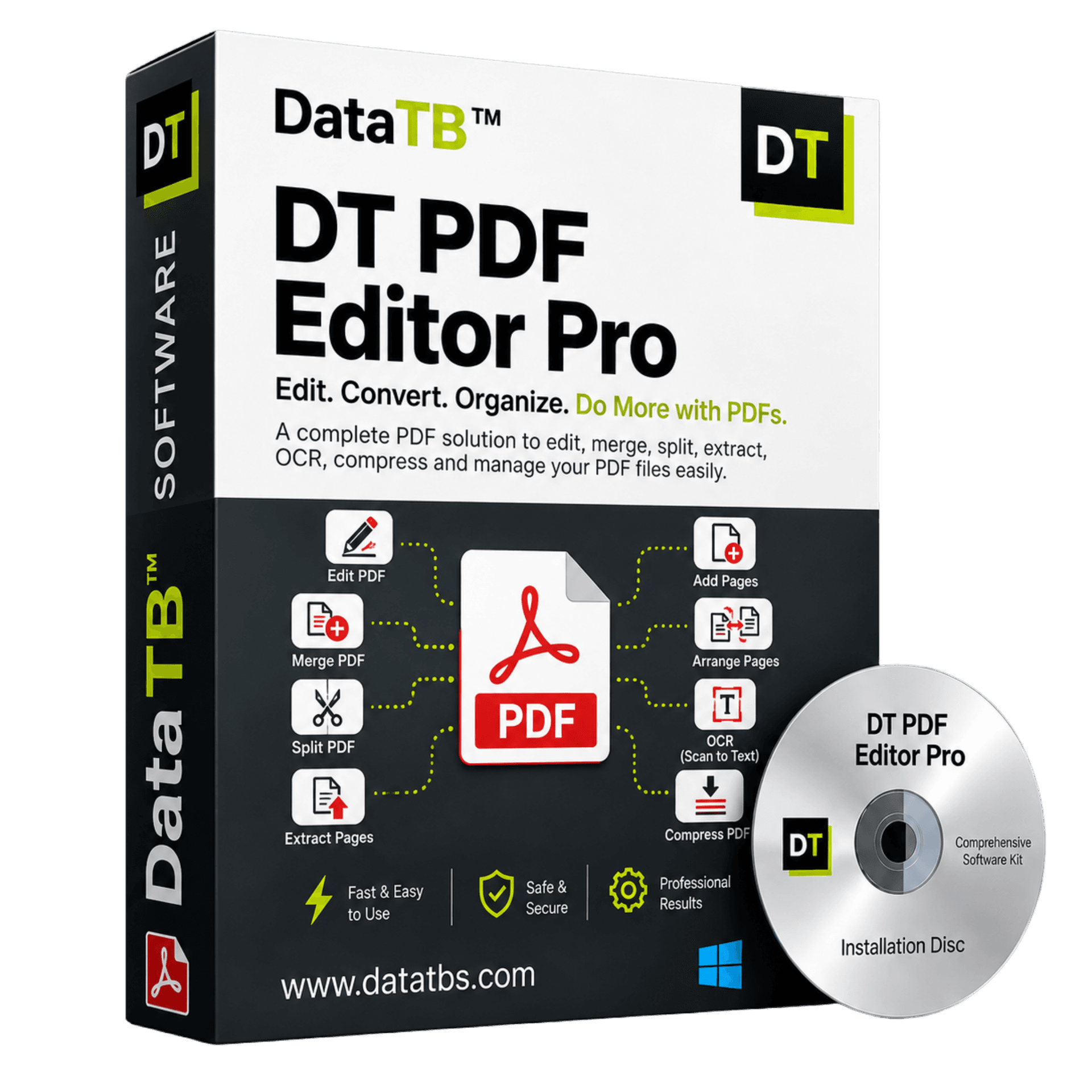
Quick Summary:DT PDF Editor Pro handles the things people actually need from PDF editor software: real editing, merging, splitting, reordering, compressing, watermarking, redacting, encrypting, and running OCR on scanned files, plus a built-in local AI assistant, all inside one straightforward interface.
What Is DT PDF Editor Pro
DT PDF Editor Pro is a complete PDF editing application for Windows. It handles the things people actually need from PDF editor software: real editing, changing the text and images that make up a page, real document management, merging, splitting, reordering, compressing, watermarking, redacting, encrypting, and running OCR on scanned files, and a built-in AI assistant you can ask questions to about the document you have open, all inside one interface.
Most PDF tools force a trade-off. Free tools usually limit you to annotations, comments, or a signature box, not actual text editing. Paid, enterprise-grade software gives you full editing power, but at a price and complexity built for large teams, not someone who needs to fix a contract twice a month.
DT PDF Editor Pro sits in between: full editing capability, organized into a straightforward set of tools, without the bloat.
It is built around a single active document workspace. You open a file, and every tool you might need - edit, merge, split, extract, delete, reorder, watermark, encrypt, redact, or OCR - is one click away in the same sidebar. There is no separate app for merging and a separate app for redacting.
Full Feature Breakdown
1. Edit PDF Text and Images Directly
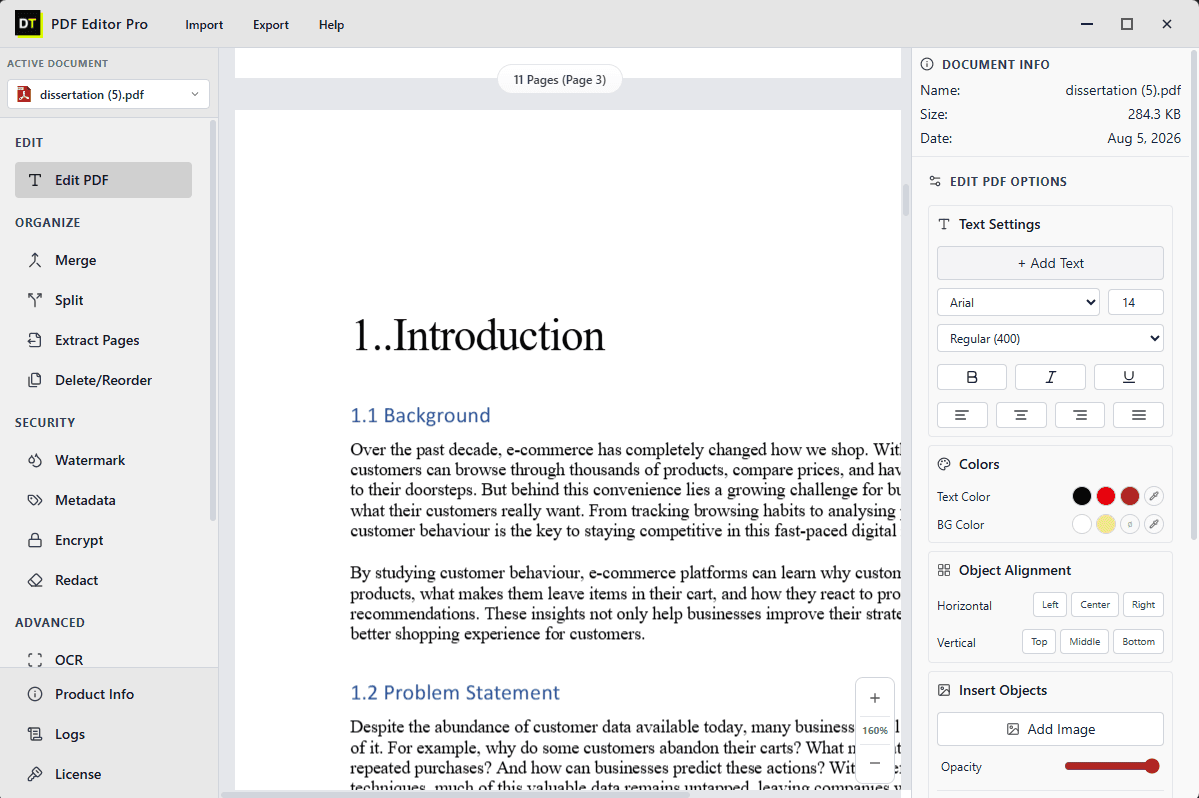
This is the core of DT PDF Editor Pro, and the feature that separates it from tools that only let you draw or comment on a page. Click into any paragraph and change the actual words, the way you would in a document, not by covering the old text with a white box and typing over it.
- • Add new text anywhere on the page, in any font, size, and style
- • Change font family, size, weight (regular, bold, italic, underline), and alignment on existing text
- • Set text color and background color independently
- • Insert new images or objects, with full control over placement and opacity
- • Snap inserted objects to left, center, right, top, middle, or bottom alignment automatically
Where this matters: fixing a typo in a signed contract before resending it, updating a figure in a finished report, correcting a date on an invoice template, or adjusting a paragraph in a dissertation without touching the surrounding layout.
2. Merge PDF Files Into One Document
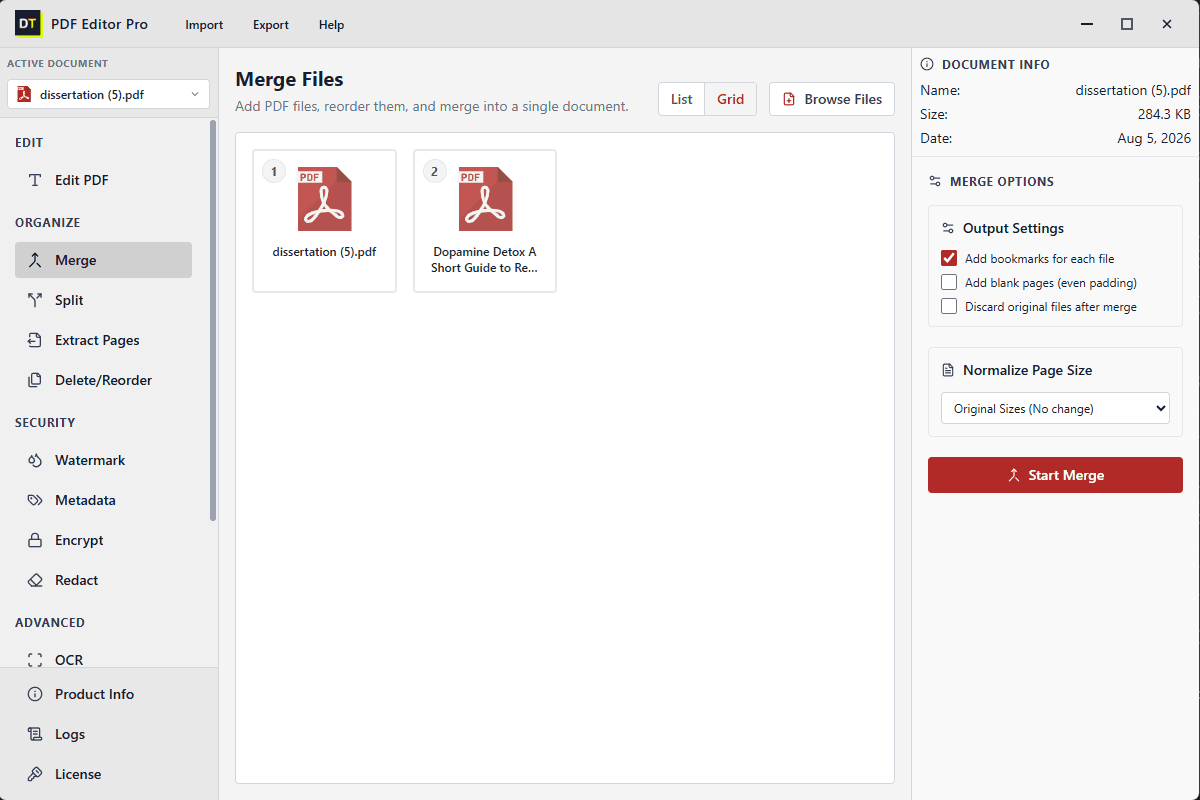
Combine two or more PDFs into a single file, in whatever order you choose, using a list or grid view to arrange them.
- • Automatic bookmark generation for each source file, so readers can jump straight to a section
- • Page size normalization, so files created at different original sizes come together as one consistent document
- • Optional blank padding pages, so each source file starts on an even page for print
- • Optional automatic deletion of the source files once the merge is complete
Where this matters: combining a cover letter, resume, and portfolio into one submission, or merging twelve monthly reports into a single bookmarked annual document.
3. Split PDF Files by Range, Page Count, or Bookmark
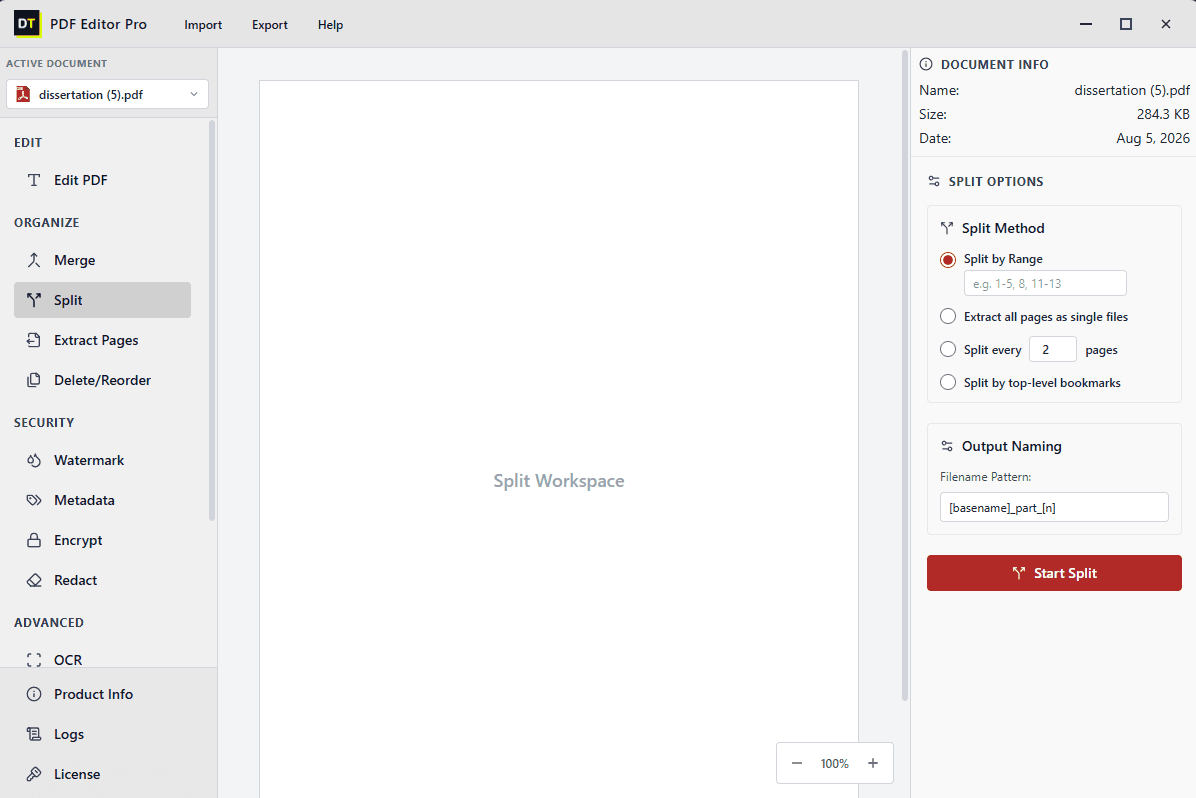
The split tool divides one PDF into multiple output files using whichever method fits the source document:
• Split by range: define exact page ranges, such as 1 to 5 and 8 and 11 to 13, and each becomes its own file
• Extract all pages as single files: every page becomes a standalone PDF
• Split every N pages: divide the document into equal chunks at a page count you set
• Split by top-level bookmarks: use the source document's existing bookmark structure to split it section by section
Output files follow a naming pattern you define, such as basename_part_1, basename_part_2, so generating dozens of correctly labeled files from one large document takes a single pass.
Where this matters: breaking a scanned textbook into individual chapters, or dividing a long government form into the sections different departments need.
4. Extract, Delete, and Reorder Pages
Beyond splitting the whole document, DT PDF Editor Pro lets you work page by page:
• Extract specific pages into a new file without altering the source
• Delete pages you no longer need
• Drag pages into a new order directly inside the document view
Where this matters: pulling just the signature page from a long agreement, removing a blank scanned page, or fixing a scanned document that came out of order.
5. Add Custom Watermarks
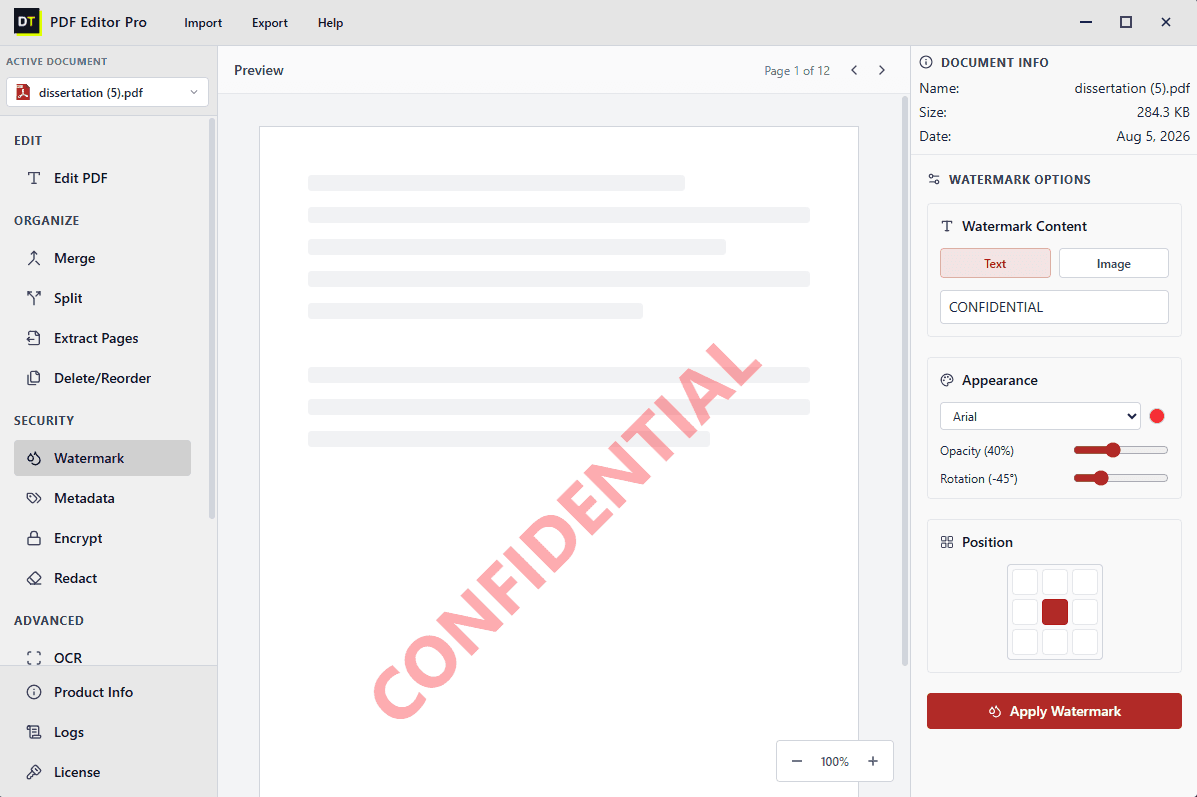
Apply a text or image watermark across every page of a document in a single action, with full control over how it looks:
• Text or image watermark content
• Font and color selection
• Opacity, from a subtle stamp to a bold overlay
• Rotation angle, including the standard diagonal "CONFIDENTIAL" style
• Position, placed anywhere across a 3x3 grid on the page
Where this matters: marking draft contracts before internal review, or branding a report with a company name before it goes to a client.
6. View and Edit PDF Metadata
Every PDF carries metadata that is not visible on the page itself: author, title, creation date, and other document properties. DT PDF Editor Pro lets you view and edit this directly, which matters for keeping shared files consistent with a company's naming and authorship standards, and for correcting outdated information before a document goes external.
7. Encrypt PDFs With Password Protection
Lock a document with a password so only people you choose can open, print, or edit it, before sending it by email or sharing it through a drive.
8. Redact Sensitive Content Permanently
Redaction in DT PDF Editor Pro removes the selected content from the document itself, not just from view. Many tools "redact" by placing a black rectangle over text while the original text remains extractable underneath. DT PDF Editor Pro deletes the content, so it cannot be recovered by copying the text or opening the file in another editor.
Where this matters: removing account numbers, names, or medical details before sharing a document with a third party or submitting it for legal review.
Read how PDF redaction actually works9. OCR for Scanned Documents
The OCR tool converts scanned pages and image-based PDFs into searchable, selectable, editable text, turning flat scans, old contracts, photographed forms, printed receipts, into documents you can actually search and edit like any other digital file.
Where this matters: digitizing years of paper archives, making a scanned dissertation appendix searchable, or converting a photographed receipt into text for expense reporting.
Explore OCR feature for scanned PDFs10. Compress PDF File Size
Reduce the file size of a PDF without noticeably affecting the quality of text or images inside it. Compression is useful for documents that need to be emailed, uploaded to a portal with a size limit, or archived in bulk without eating up storage.
Where this matters: shrinking a scanned, image-heavy report so it fits within an email attachment limit, or reducing the size of an entire archive of scanned documents before storing it long term.
11. Chat With Your PDF Using Built-In Local AI
DT PDF Editor Pro includes a built-in AI assistant that lets you ask questions about the document you have open and get answers drawn directly from its content, instead of scrolling and searching manually. Ask it to summarize a section, find a specific clause, explain a paragraph in plain language, or pull out a figure buried on page forty, and it responds based on what is actually in the file.
The AI assistant runs locally, on the same device as the rest of the application, so the document you are chatting about is not sent to an external AI service to generate a response.
• Ask natural-language questions about the open document and get direct answers
• Summarize long sections, chapters, or the entire document on request
• Locate specific clauses, figures, or mentions without manual searching
• Get plain-language explanations of dense or technical sections
Where this matters: quickly finding a specific clause in a long contract, summarizing a chapter of a dissertation before a meeting with a supervisor, or getting a fast explanation of a dense technical report without reading it end to end.
How DT PDF Editor Pro Compares
| Factor | DT PDF Editor Pro | Typical Free/Browser Editor |
|---|---|---|
| Text editing | Full text editing, not just annotation | Often limited to comments and highlights |
| File size limits | No practical limit | Commonly capped between 2 MB and 100 MB |
| Redaction | Permanent removal from the file | Frequently just a visual overlay |
| Toolset | Edit, merge, split, compress, watermark, encrypt, redact, OCR, and AI chat in one app | Usually one or two tools per app |
| Document AI assistant | Built in, runs on-device | Rare, and usually cloud-based when it exists |
| Pricing model | Pay for the period you needview pricing plans | Often locked into an annual subscription |
System Requirements
| Software Version | 1.1.0 |
| Software Size | 54.2 MB |
| Operating System | Windows 11, Windows 10, Windows 8.1 |
| Supported Formats | PDF, standard image formats (for OCR) |
| Internet Connection | Offline tool, no internet connection required |
| Processor | 1 GHz or faster processor |
| Memory (RAM) | 4 GB RAM minimum |
Who DT PDF Editor Pro Is Built For
Students and researchers
Editing dissertations, merging chapters with appendices, extracting sections for submission, and reordering scanned research material.
Small and growing businesses
Preparing contracts, invoices, and proposals, watermarking drafts before internal circulation, and password-protecting anything sent outside the company.
IT administrators and managed service providers
Standardizing PDF workflows across a team and keeping activity logs for audit purposes.
Legal, compliance, and HR teams
Permanently redacting sensitive information before disclosure, encrypting files before distribution, and editing metadata to meet record-keeping standards.
Anyone digitizing paper records
Using OCR to turn old scanned archives into searchable, editable digital documents.
How It Works
Open your file
Import a PDF into the active document workspace.
Choose your tool
Editing, merging, splitting, watermarking, redacting, encrypting, and OCR are all in the same sidebar.
Save your file
Export the finished document, ready to send, print, or archive.
What Real Users Say
"Honestly, I was tired of paying Adobe's hefty subscription just to edit a few invoices and redact client details. DT PDF Editor Pro does exactly what I need, runs completely offline, and there is no monthly BS. Best investment for my small agency."
Rahul Desai
Small Agency Owner
Verified by Data TB
"The local AI chat is a game changer! I often have to go through 50-page legal contracts to find specific clauses. Now I just ask the AI, and since it runs locally, I don't have to worry about uploading sensitive client data to the cloud."
Sarah Jenkins
Operations Director
Verified by Data TB
"Solid, no-nonsense software. I needed something to merge massive scanned architectural plans and run OCR on them. It handled a 2GB file without crashing, unlike the browser-based tools I tried before. Highly recommended for heavy workflows."
Liam O'Connor
IT Administrator
Verified by Data TB
Frequently Asked Questions
?What is DT PDF Editor Pro?
DT PDF Editor Pro is a desktop PDF editor software for Windows that lets you edit PDF text and images, merge and split files, reorder pages, add watermarks, edit metadata, encrypt documents, permanently redact sensitive content, and run OCR on scanned files, all in one application.
?Can I edit the actual text in a PDF, or only add comments?
Yes. DT PDF Editor Pro allows full text editing directly inside the document, including font, size, style, alignment, and color changes, not just comments or annotations layered on top.
?Is redaction in DT PDF Editor Pro permanent?
Yes. Redacted content is removed from the document itself, not just covered visually, so it cannot be recovered through copy-paste or text extraction.
?What file size can DT PDF Editor Pro handle?
There is no practical file size limit, so large scanned archives, multi-chapter documents, and bundled reports are all supported.
?Can DT PDF Editor Pro read scanned or image-based PDFs?
Yes. The built-in OCR tool converts scanned pages into searchable, selectable, editable text before you begin editing.
?Can I merge PDF files that were created at different page sizes?
Yes. The merge tool includes a page size normalization option so files from different sources come together as one consistent document.
?Can I password protect a PDF with DT PDF Editor Pro?
Yes. You can encrypt any document with a password so only people you choose can open, print, or edit it.
?Can I reduce the file size of a PDF?
Yes. The compression tool reduces file size while keeping text and images clear enough for everyday reading and printing.
?Can I chat with my PDF and ask it questions?
Yes. DT PDF Editor Pro includes a built-in AI assistant that answers questions about the open document, summarizes sections, and locates specific information inside the file, running locally on your own device rather than through an external AI service.
?Is DT PDF Editor Pro a subscription?
Pricing follows Data TB's standard model, pay for the period you actually need, rather than being locked into an annual commitment.
Ready to simplify your PDF workflow?
Get the complete desktop PDF editor software for Windows without the bloat and without the monthly subscription.