
Every Byte Matters.
DT Google Drive Duplicate Finder
Remove Duplicates Without Downloading a Single File
DT Google Drive Duplicate Finder scans Personal Google Drive or Google Workspace accounts, finds every duplicate file, photos, documents, videos, archives, and lets you review and remove them without downloading a single file.
Hash-accurate detection, nothing deleted without confirmation, and files stay in Google Drive, never on our servers.


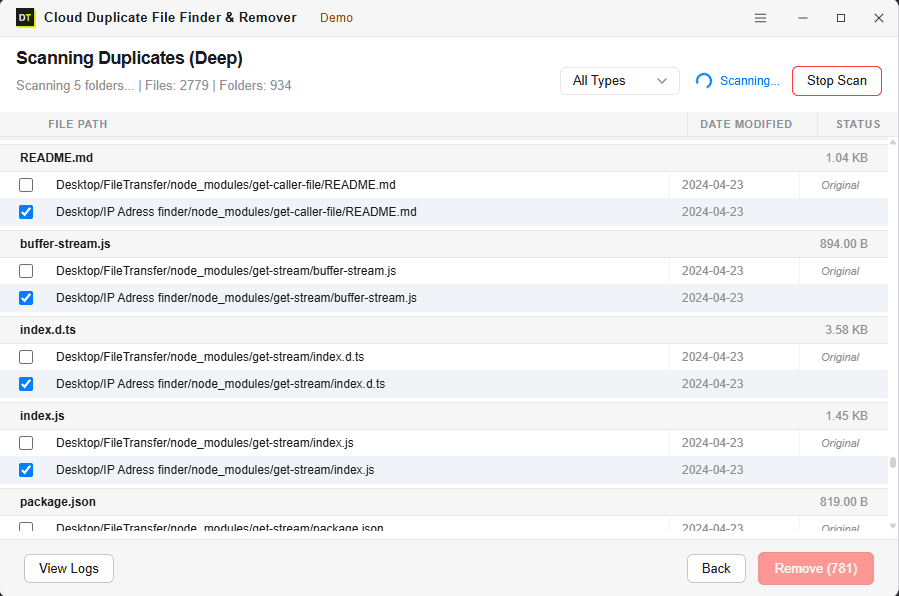
Quick Summary:DT Google Drive Duplicate Finder scans Personal Google Drive or Google Workspace accounts for duplicate files, photos, and videos with hash-accurate precision, and lets you review and remove them without downloading a single file to your machine.
Key Features of DT Google Drive Duplicate Finder
Zero-download scanning: runs entirely through Google's official Drive API, files never leave your account
Two scan modes: Fast Scan by name and size, Deep Scan by file hash for byte-for-byte accuracy
Personal and Google Workspace support: including admin delegation for multi-user scanning
Official Google OAuth login: your password never enters the app or touches our servers
My Drive and Shared with Me coverage: catches duplicates hiding across both locations, including overlap between them
Folder-level selective scanning: scan the entire account or specific folders only
Smart result grouping: duplicates organized by file type, size and folder
Full storage audit, not just duplicates: Large Files, Not Owned by Me, and Empty Folders surfaced alongside duplicate results
Google Trash safety net: removed files go to Google Drive's Trash, recoverable for 30 days
Full activity log: every scan and removal recorded with a timestamp
Free scan, paid removal: run a complete Deep Scan at no cost before deciding to buy
Why Google Drive Keeps Getting Full
Most people assume they simply have too many files. In practice, the real cause is usually too many copies of the same files, and Google Drive has a few specific habits that make this worse than on other platforms.
- A phone's Google Photos backup re-uploads the same photo every time the cache clears and re-syncs, since the file picks up a new timestamp each time.
- A shared folder brings in files a teammate already added, files that already exist somewhere else in the account under a different name.
- A file gets downloaded, edited and re-uploaded, and the original never gets deleted, leaving two versions permanently eating storage side by side.
- A migration from an old Google account to a new one transfers some files twice without anyone noticing.
The part most people miss: Google Drive storage is shared storage.
It is not separate from Gmail or Google Photos, all three services draw from the same quota. Every duplicate file sitting in Drive is directly eating into the space Gmail needs for email and Google Photos needs for pictures. One account, one storage limit, three services competing over it.
Fast Scan vs Deep Scan: Finding Every Duplicate
Fast Scan
Matches files by name and size.
Best for a quick cleanup pass on accounts where duplicates are obvious, re-uploads or synced copies with matching filenames.
Handles accounts with over 100,000 files quickly, catching exact copies, re-uploaded files and synced duplicates from multiple devices.
What it misses: a duplicate that has been renamed, since the match depends on the filename staying the same.
Deep Scan
Matches files by a unique hash value, a byte-level fingerprint of the actual file content.
Best used before a migration, a storage audit, or any time complete accuracy matters more than scan speed.
Deep Scan catches everything Fast Scan catches, plus renamed duplicates, re-saved files, and the same photo sitting in different folders under different names.
Accuracy Guarantee: If two files share identical content, Deep Scan finds them, regardless of what either file is named.
Works on Both Types of Google Accounts
Personal Google Drive
For Free and Google One accounts.
A personal Google account collects photos, documents and files from a phone and a computer over years of everyday use.
- ✓ Scan all of My Drive, Shared with Me, or select specific folders
- ✓ Review every duplicate found
- ✓ Remove what is not needed
- ✓ Reclaim storage without paying for a Google One upgrade
Google Workspace
For Business and Enterprise accounts connected to an organization.
Scan your own Drive directly, or use admin delegation to scan and manage duplicates across multiple user accounts in the organization from a single dashboard, without logging into each account individually.
- ✓ Scan your own Drive directly
- ✓ Admin delegation for multi-user scanning across the organization from a single dashboard
- ✓ No need to log in as each user. Ideal for IT admins managing storage at scale
Beyond Duplicates: A Full Storage Audit in the Same Scan
Duplicate files are rarely the only thing quietly consuming a Google Drive account. Every scan also surfaces three other categories that most duplicate finders never look at.
Large Files
The files actually responsible for a full storage quota are not always duplicates, sometimes a single unedited 4K video export or an old virtual machine image sitting forgotten in a subfolder is worth more gigabytes than a hundred duplicate documents combined. Large Files surfaces these directly, sorted by size, so the biggest wins are visible immediately instead of buried under smaller results.
Not Owned by Me
Files shared into an account by someone else, then forgotten, still count against that account's storage in some scenarios and always clutter search results and folder views regardless. This view separates content actually owned by the account from content merely shared into it, which matters most for Workspace admins trying to understand what an account is genuinely responsible for.
Empty Folders
Years of reorganizing, half-finished projects and old folder structures leave behind empty folders that add nothing but clutter to search and navigation. These are flagged and can be cleared in the same pass as the duplicate cleanup.
None of this requires a separate scan or a separate tool. The same Fast or Deep Scan that finds duplicates surfaces all three categories together, turning a duplicate cleanup into a genuine storage audit.
How to Find and Remove Google Drive Duplicates in 4 Steps
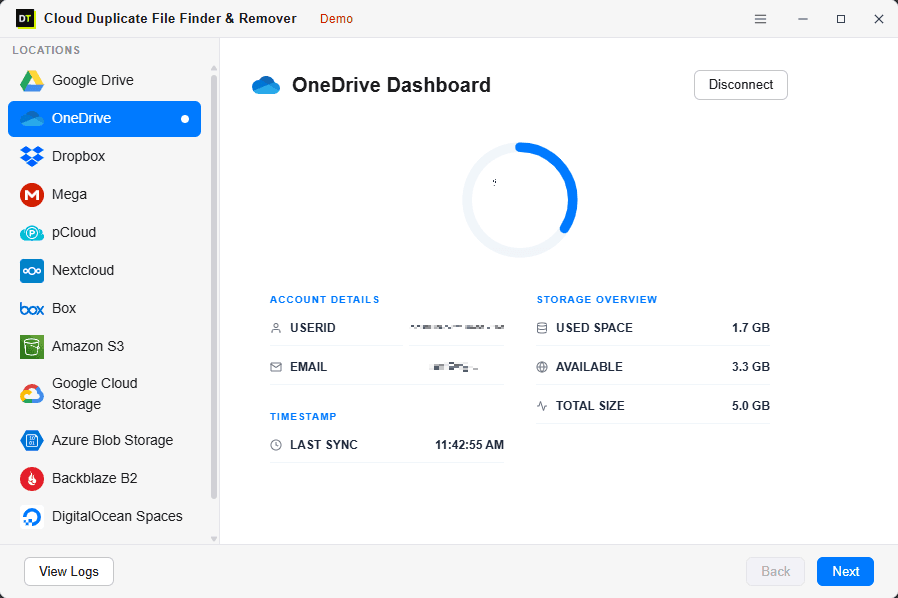
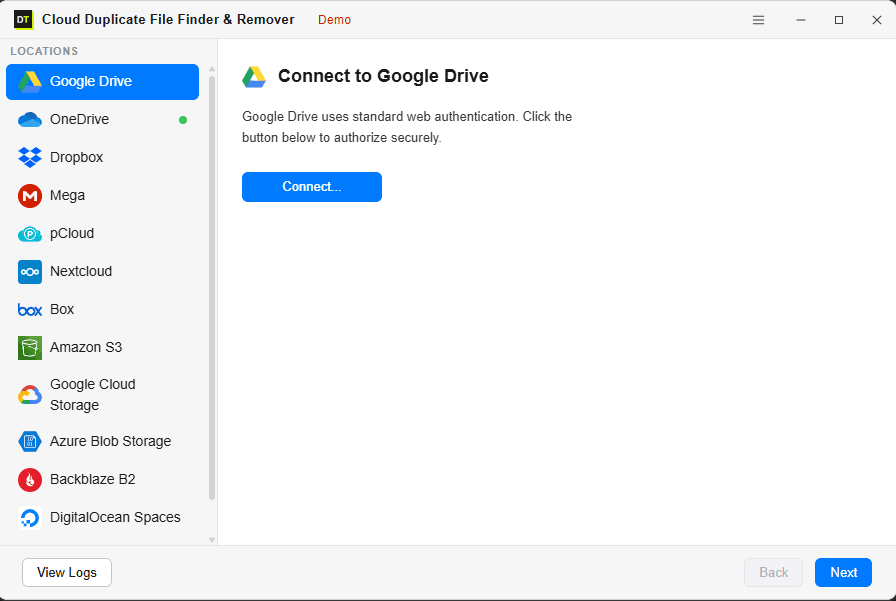
Step 1: Connect Your Google Account
Sign in with official Google OAuth, the same secure screen used to authorize any trusted Google app. The password never enters the app and never touches our servers.
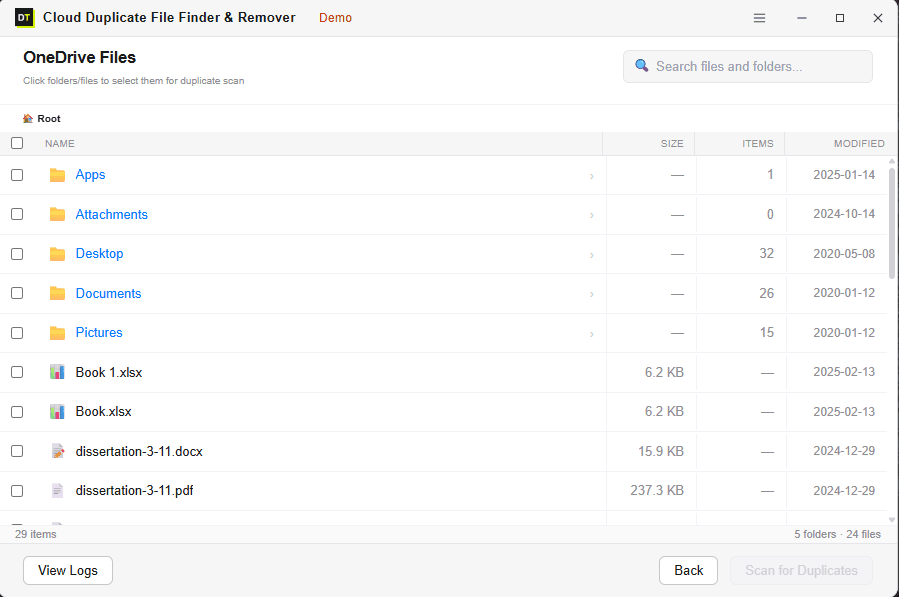
Step 2: Browse and Select What to Scan
Choose the scan scope before a single file is checked. Browse My Drive, Shared with Me, or specific folders, and select exactly what to include. A forced full-account scan is never required.
Step 3: Choose Your Scan Mode
Fast Scan for speed, Deep Scan for accuracy. Watch the scan run live, with real-time file count, folder count and per-file status as duplicates are found and grouped.
Step 4: Review and Remove
Every duplicate is shown before anything is deleted. Review what was found, confirm what to remove, and bulk-remove in one action. Removed files go to Google Drive's Trash, not permanent deletion.
We Find the Duplicates.
We Never Read What's Inside the Files.
Finding duplicates does not require reading a file's content. DT Google Drive Duplicate Finder connects through Google's official API using OAuth 2.0.
What is read:
file name, file size, and hash value for Deep Scan. That is the full extent of it.
What is never read:
document text, photo content, spreadsheet data, or anything inside the files themselves.
Files are never downloaded to your machine during a scan, and they are never stored on our servers. No one at Data TB can see what is inside your Drive. The entire scan runs through Google's own infrastructure, reading fingerprints, never the files themselves.
Official Google OAuth
Connects through Google's official API using OAuth 2.0. Password never touches our servers.
Zero Local Downloads
Files are never downloaded to your machine during a scan or stored on our servers.
Google Trash Safety Net
Removed files go to Google Drive's Trash - restorable within 30 days.
Full Activity Log
Every scan and removal recorded with a timestamp for complete transparency.
Situations Basic Duplicate Finders Usually Miss
Renamed duplicates.
Deep Scan's hash matching finds files with identical content even when the name is completely different, "Proposal_Draft.pdf" and "Proposal_FINAL_Submitted.pdf" with identical content are both caught.
Duplicates in different folders.
The scan covers the entire selected scope, not one folder at a time, so files hiding in nested subfolders or unrelated directories are still found and grouped together.
"Shared with Me" files creating duplicates.
Files shared with you that were also added to My Drive create a duplicate the moment both copies exist. The scan covers both locations and flags the overlap directly.
Multiple Google accounts.
Connect more than one account and manage all of them from one dashboard, no switching between browser tabs or separate login sessions.
Google Workspace with multiple users.
Admin delegation scans and manages duplicates across multiple Workspace user accounts from one place, no individual logins required.
Accounts with 100,000+ files.
Multi-threaded scanning handles large accounts without timeouts, with real-time progress showing exactly where the scan stands at every moment.
DT Google Drive Duplicate Finder: Free Scan vs Full Version
Run a full Deep Scan for free first. See exactly how many duplicates exist, how much space would be recovered, and where they are hiding, before spending anything.
| Feature | Free Scan | Full Version |
|---|---|---|
| Connect Personal Google Drive | Included | Included |
| Connect Google Workspace | Included | Included |
| Fast Scan | Included | Included |
| Deep Scan, hash-accurate | Included | Included |
| View storage summary and details | Included | Included |
| Scan My Drive and Shared with Me | Included | Included |
| Folder-level selective scanning | Included | Included |
| Smart grouping of results | Included | Included |
| Large Files, Not Owned by Me, Empty Folders | Included | Included |
| Preview duplicates before action | Included | Included |
| Activity log | Included | Included |
| Remove duplicates | Not included | Included |
| Admin delegation, Workspace | Not included | Included |
| Bulk removal | Not included | Included |
| Multiple account management | Not included | Included |
Who Uses DT Google Drive Duplicate Finder
Individual users near their storage limit.
Google One prompts an upgrade from 15GB to 100GB before checking whether duplicates are the actual cause. Most users find gigabytes of recoverable space on the first scan.
Photographers and content creators.
Phone camera backups create hundreds of duplicate photos over time, many renamed during editing and only catchable through hash-based matching.
Students and freelancers.
Files shared by professors or clients accumulate alongside versions already saved locally, creating quiet, invisible storage waste over months.
IT administrators.
Multiple users, shared drives, years of accumulated duplicates. Admin delegation scans every account and manages the cleanup centrally.
MSPs auditing clients.
A quick storage audit before renewing a Google Workspace plan shows exactly how much of a client's Drive is genuine data versus accumulated duplicate waste.
Teams migrating domains.
Moving domains or merging tenants goes smoother when duplicates are cleared first, so only what actually matters gets migrated.
System Requirements
Frequently Asked Questions
QDoes the tool download my Google Drive files to find duplicates?
ANo. The scan runs entirely through Google's official Drive API. Files are never downloaded to your machine or stored on our servers. Only metadata and hash values are read during a scan.
QWhat is the difference between Fast Scan and Deep Scan?
AFast Scan matches by file name and size, quick but can miss renamed duplicates. Deep Scan matches by a unique file hash, fully accurate regardless of file name or location. Use Fast Scan for speed, Deep Scan before migrations or audits.
QWill it accidentally delete files I want to keep?
ANo file is removed automatically. Every duplicate found goes through manual review before any deletion, and removed files go to Google Drive's Trash, restorable within 30 days.
QDoes it scan "Shared with Me" files?
AYes. "Shared with Me" can be included in the scan scope, and the tool flags when shared files duplicate files already sitting in My Drive.
QCan it find duplicates with different file names?
AYes, with Deep Scan. Hash-based matching identifies files with identical content regardless of name, date or which folder they sit in.
QDoes it work on Google Workspace business accounts?
AYes. Google Workspace is fully supported, and admin delegation allows scanning and managing duplicates across multiple user accounts in an organization from one dashboard.
QMy Google Drive has over 100,000 files. Will it handle that?
AYes. Multi-threaded scanning handles large accounts efficiently without timing out, with real-time progress shown throughout.
QIs the free scan actually useful, or just a limited teaser?
AThe free scan runs a complete Fast or Deep Scan and shows every duplicate found, file count, storage wasted, and the exact location of each duplicate. Only removal requires the paid version.
QWhy does cleaning up Google Drive also help my Gmail storage?
AGoogle Drive, Gmail and Google Photos share the same overall storage quota. Removing duplicate files in Drive frees up space across all three, not just Drive itself.
QDoes it find anything besides duplicate files?
AYes. The same scan also surfaces Large Files sorted by size, files that are shared into the account but Not Owned by Me, and Empty Folders, so a single scan doubles as a full storage audit rather than only a duplicate cleanup.
QWhat does "Not Owned by Me" mean, and why does it matter?
AIt separates files genuinely owned by the connected account from files shared into it by someone else. This is especially useful for Workspace admins trying to understand what storage an account is actually responsible for versus what is only appearing in it through a share.
What Real Users Say
"Google One kept telling me my 100GB was full. I ran a free scan and realized 40% of my storage was just duplicate photos re-uploaded from my phone over the years. Upgraded, removed them all, and cancelled my Google One upgrade."
David M.
Photographer
Verified by Data TB
"Managing a Google Workspace for 50 employees means dealing with endless duplicate files in shared drives. The admin delegation feature let me scan the entire org from one dashboard. It's exactly what Google Admin is missing."
Elena V.
IT Director
Verified by Data TB
"I accidentally duplicated my entire college project folder twice. This tool found the exact copies instantly, even though some of them had 'Copy of' added to the file name. Fast, accurate, and completely secure."
Rahul S.
Student
Verified by Data TB
Find Out How Much of Your Google Storage Is Actually Wasted Space
Google gives 15GB shared across Drive, Gmail and Photos. Most accounts active for a few years are using 30 to 40 percent of that on duplicate files nobody knew existed. The free scan shows exactly what is there in minutes, without downloading anything and without deleting anything. Run the scan first, decide after.