
Every Byte Matters.
DT Database Backup Wizard
Automated Database Backup Software for SQL Server, MySQL, PostgreSQL and MongoDB
DT Database Backup Wizard is a Windows application for automated database backup across SQL Server, MySQL, PostgreSQL, MongoDB, MariaDB, Oracle, SQLite, Firebird, IBM DB2 and any ODBC data source. Schedule backups once, and every run after that happens on its own: compressed, encrypted, and delivered to local storage or a cloud destination such as Amazon S3, Google Drive, OneDrive, SFTP or FTP.


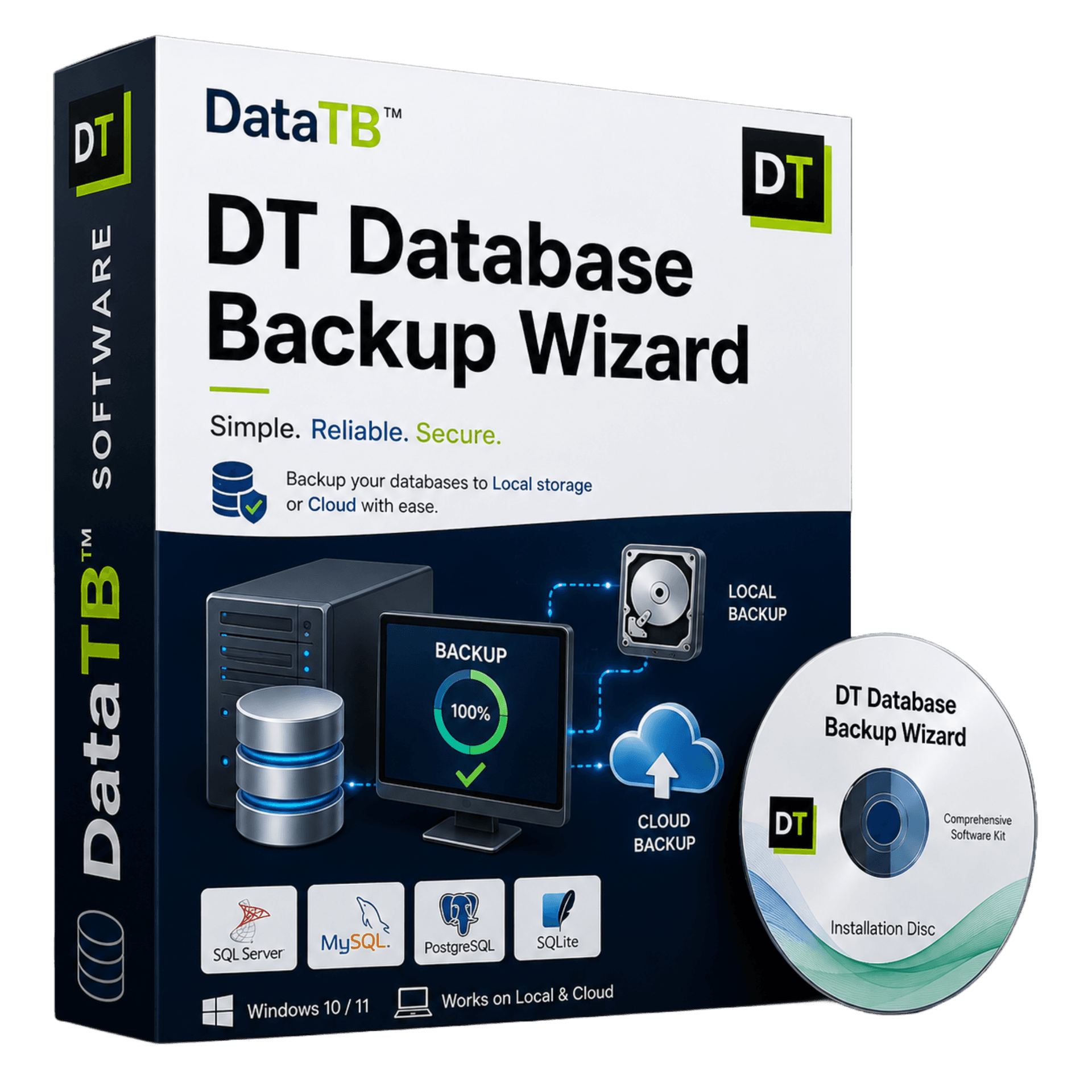
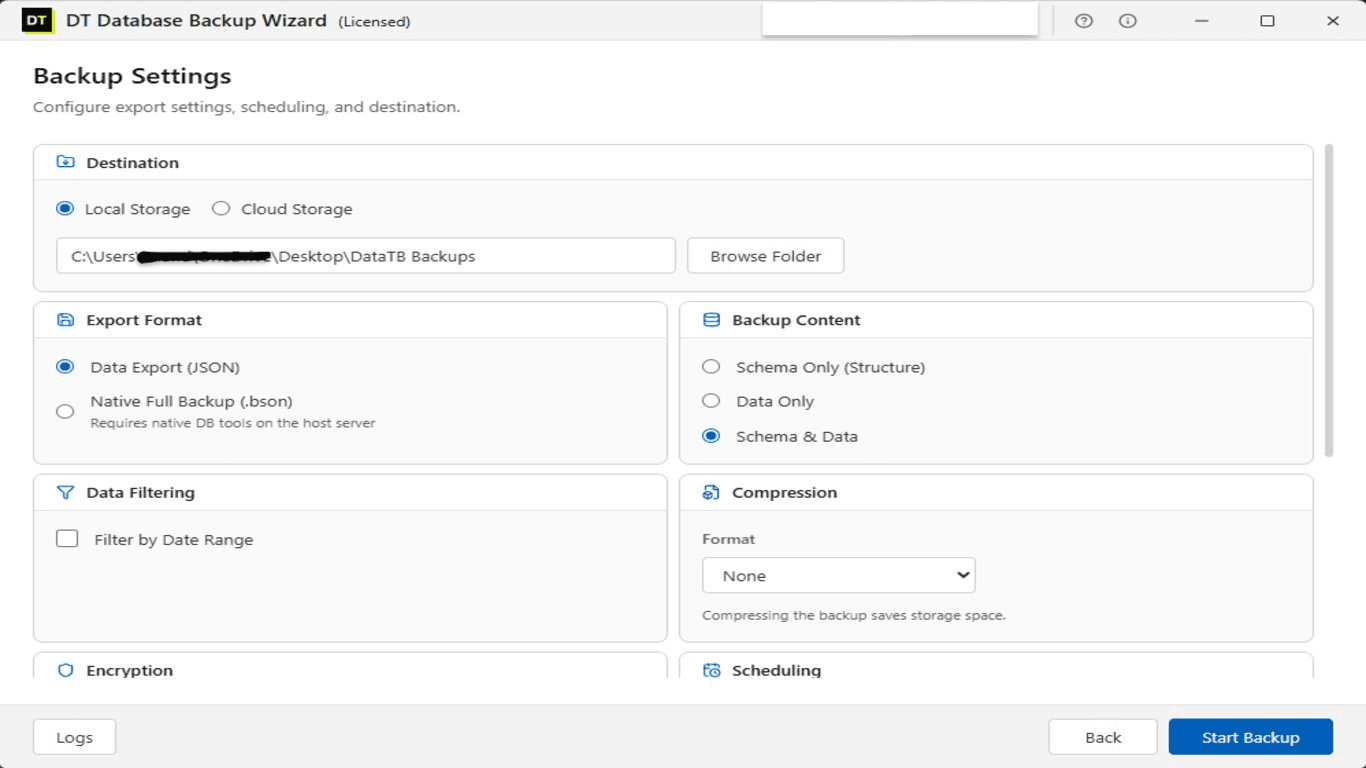
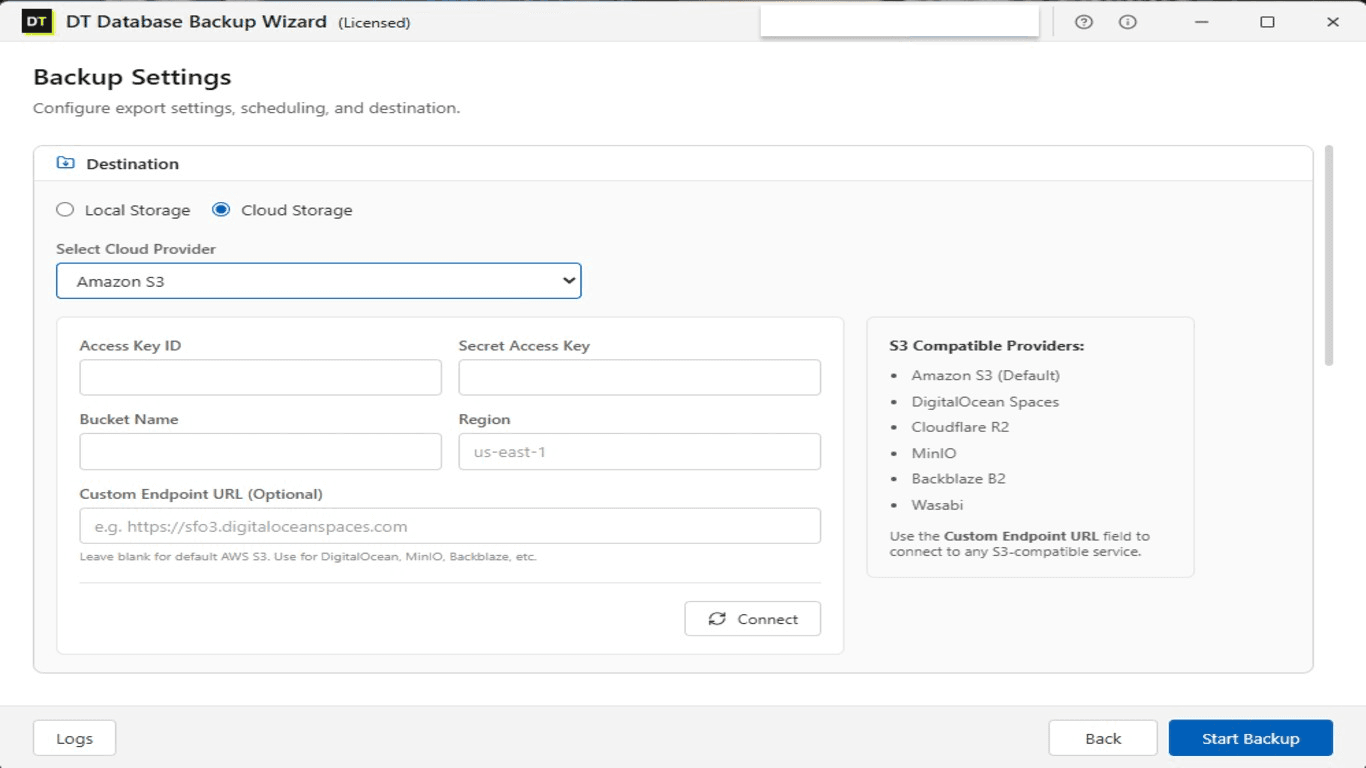
Quick Summary:Database Backup Wizard is an all-in-one, automated database backup solution supporting 10 distinct engines including MySQL, SQL Server, PostgreSQL, MongoDB, Oracle, Firebird, and IBM DB2. Schedule secure, AES-256 encrypted backups with automated retention policies directly to S3, Google Drive, OneDrive, Mega, or local storage using a single intuitive dashboard.
Key Features of DT Database Backup Wizard
10+ database engines supported
SQL Server, MySQL, PostgreSQL, MongoDB, MariaDB, Oracle, SQLite, Firebird, IBM DB2, ODBC
Automated backup scheduling
Hourly, daily, weekly or custom intervals, plus one-click manual runs
Live data preview
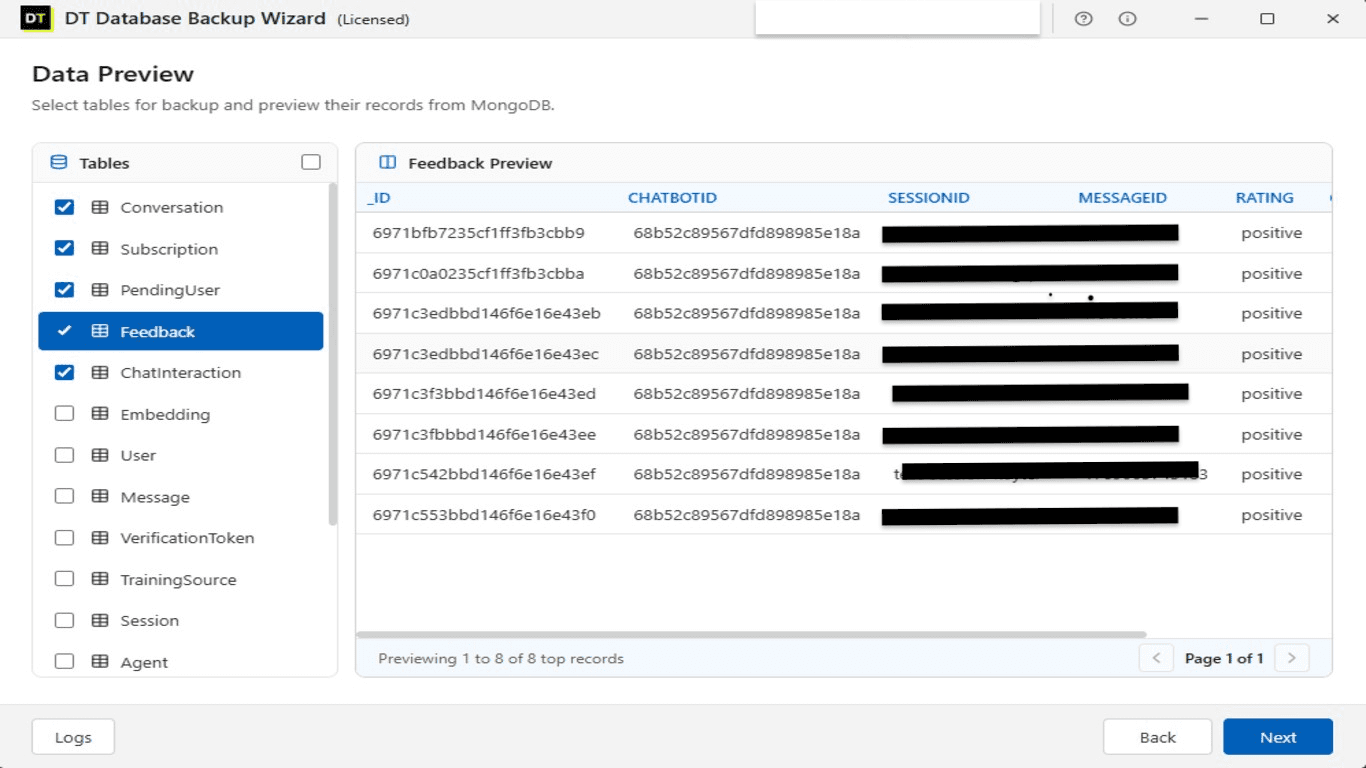
View actual tables and records before choosing what gets backed up
Flexible backup content
Full backup, schema only, data only, or a date-filtered export
7+ storage destinations
Local drive, FTP, SFTP, Amazon S3, OneDrive, Google Drive, Mega
AES encryption and compression
Applied per job, independently or together
Automatic retention policy
Old backups deleted on a schedule so storage never silently fills up
Full run history
Every scheduled and manual job logged with timestamp, status and error detail
Why Choose DT Database Backup Wizard for Database Backup Automation
Almost no team runs a single database. A typical stack looks like PostgreSQL for the core application, MongoDB for logs or a chatbot service, and a legacy MySQL or SQL Server instance nobody has migrated off yet. Each engine comes with its own native backup command, its own syntax, and its own quiet way of failing.
mysqldump triggered from a cron job that broke months ago. pg_dump piped into a shell script no one has opened since the person who wrote it left. A MongoDB Atlas snapshot policy configured once during onboarding and never checked again.
This is how most production databases actually get backed up in practice, and the first sign that something is wrong is usually the moment a restore is actually needed.
DT Database Backup Wizard replaces that pile of disconnected scripts with a single scheduled system covering every engine in the stack, with one dashboard to confirm every job actually ran.
Supported Databases
SQL Server Backup Software
Connect to any edition of Microsoft SQL Server and automate the backup process without writing a T-SQL script or configuring SQL Server Agent manually. According to Microsoft's own SQL Server documentation, a reliable backup strategy is the primary protection against accidental data loss, corruption or hardware failure. DT Database Backup Wizard removes the manual step: connect once, schedule once, and every backup after that runs on its own.
MySQL Backup Software
Replace forgotten mysqldump cron jobs with a scheduled, monitored MySQL backup job that logs every run. Full database export, schema only, or data only, all configured from the same interface used for every other engine.
PostgreSQL Backup Software
Automate PostgreSQL backups without depending on a hand-written pg_dump script that nobody has reviewed in months. Schedule full or filtered backups and send them straight to encrypted local or cloud storage.
MongoDB Backup Tool
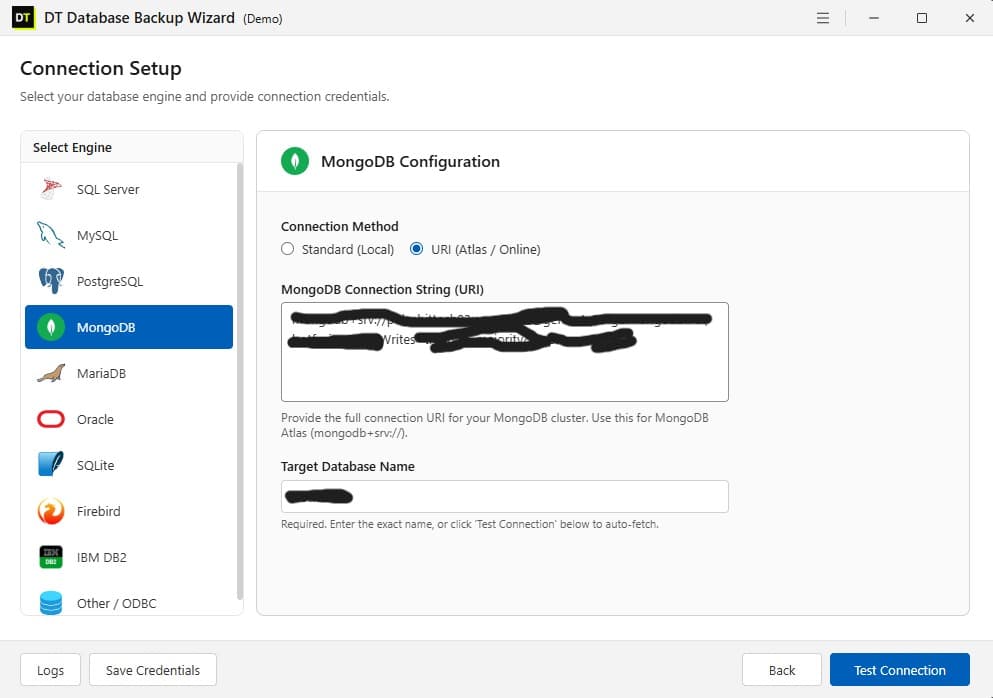
Connect through a standard local connection or a full connection URI, which covers MongoDB Atlas and other hosted clusters. Useful for teams running MongoDB for logging or a secondary service alongside a relational core database.
MariaDB Backup Software
Configured and scheduled exactly like MySQL, through the same dashboard, with no separate syntax to learn.
Oracle Database Backup
Covers legacy Oracle deployments that most lightweight backup tools skip entirely, alongside newer PostgreSQL or MongoDB systems running in the same environment.
SQLite Backup and Restore
Automated backup for lightweight and embedded SQLite databases, scheduled the same way as every other engine on this list.
Firebird Database Backup
Schedule automated backups for Firebird databases, supporting both legacy and newer versions with full encryption and compression.
IBM DB2 Backup
Enterprise-ready backup solution for IBM DB2, allowing you to back up schemas and data directly to cloud storage.
ODBC and Other Database Sources
Any database reachable through an ODBC connection can be backed up using the same scheduling, encryption and destination options as the named engines above.
Fully Supported Environments & Versions
- Microsoft SQL Server (2022, 2019, 2017, 2016, 2014, 2012)
- Azure SQL Database
- AWS RDS (SQL Server, MySQL, Postgres)
- MySQL (8.0, 5.7, 5.6)
- MariaDB (11.x, 10.x)
- PostgreSQL (16, 15, 14, 13, 12, 11)
- MongoDB (6.0, 5.0, 4.x)
- MongoDB Atlas (Cloud)
- Oracle Database (19c, 12c, 11g)
- SQLite (v3.x)
- Firebird (2.x, 3.x, 4.x)
- IBM DB2 (LUW)
- Any ODBC-compliant database
- Local, Network, & Cloud Hosted
How to Automate a Database Backup in 5 Steps
Step 1: Connect the Database
Step 2: Preview the Data
Step 3: Configure the Backup
Step 4: Choose the Destination
Step 5: Schedule and Walk Away
Database Backup Strategy: What to Actually Schedule
How often the data changes
A database that changes every few minutes needs backups on a similarly short interval. A database that changes once a day only needs a daily run.
Full vs Incremental vs Differential
A full backup captures everything and is slowest to create but fastest to restore. An incremental backup only captures what changed since the last backup of any type. A differential backup captures everything changed since the last full backup, a middle ground most teams find easier to manage.
The 3-2-1 Rule
Keep at least three copies of the data, on two different types of storage, with one copy stored offsite. A local backup plus a cloud backup, both on the same schedule, satisfies this with almost no extra effort.
Grandfather-Father-Son rotation
Keep daily backups for a short window, weekly backups for a longer window, and monthly backups for long term retention, deleting anything older automatically. This is exactly what a retention policy is built to automate.
Hot backup versus cold backup
A hot backup runs while the database stays online and serving traffic, which is what almost every production system needs. A cold backup requires the database to be stopped first, rarely acceptable outside a scheduled maintenance window. DT Database Backup Wizard's scheduling and retention settings are built around these principles directly.
DT Database Backup Wizard: Free Demo vs Full Version
| Feature | Free Demo | Full Version |
|---|---|---|
| Database engines | All 10 supported, connection testing included | All 10 supported |
| Manual backup runs | Up to 2 per database | Unlimited |
| Scheduled automated backups | Limited | Included |
| Cloud destinations (S3, Drive, OneDrive, Mega) | Limited | Included |
| Encryption and compression | Preview only | Full access |
| Retention policy automation | Limited | Included |
| Support | Community / Documentation | Priority Email & Live Support |
| Price | Free | $49 |
Everything the Backup Control Center Tracks
Backup Control Center
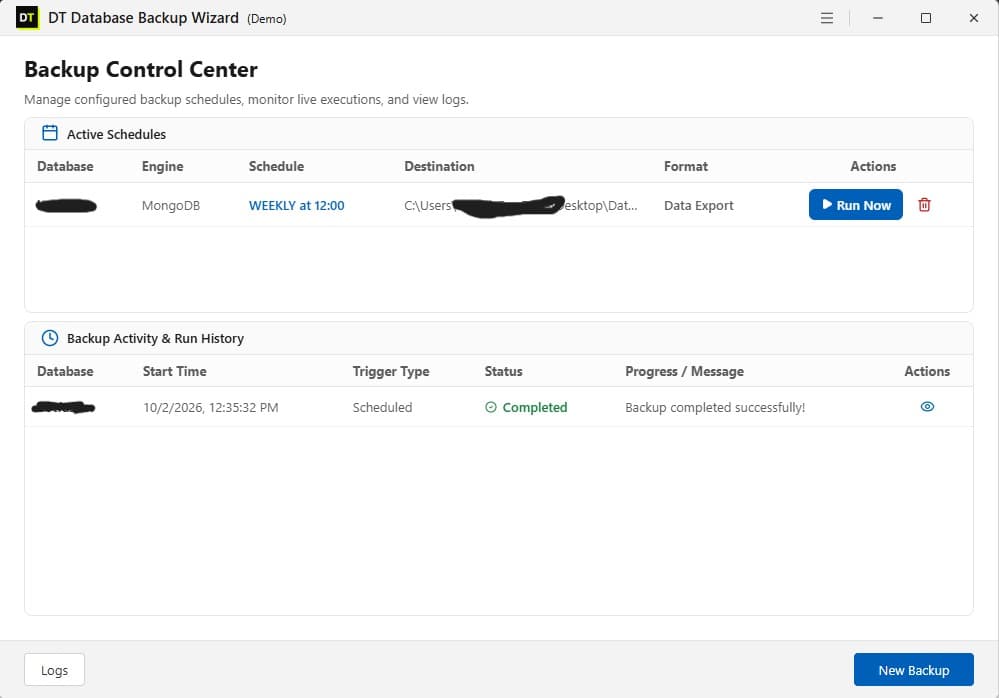
A single dashboard listing every active schedule: database, engine, frequency, destination and format, with a one-click Run Now and the option to retire jobs that are no longer needed.
Backup Activity and Run History
Every run, scheduled or manual, is logged with start time, trigger type, status and a plain language message. A failed run shows up as Failed with the actual error, instead of disappearing into a log file nobody checks.
Data Preview Before Committing
See actual tables and live record previews before deciding what gets backed up, instead of backing up blind.
Compression and Encryption
Both optional, both configurable per job, and both can run together on the same backup.
Automatic Retention Policy
Old backups are deleted based on age, so scheduled runs never silently consume an entire drive or cloud storage quota.
Six Cloud and Remote Destinations
Local storage, FTP, SFTP, Amazon S3, OneDrive, Google Drive and Mega, all configured from the same screen regardless of database engine.
DT Database Backup Wizard Compared to Typical Backup Tools
| Capability | Typical Database Backup Tools | DT Database Backup Wizard |
|---|---|---|
| Database engines supported | 3 to 5, usually MySQL, SQL Server and PostgreSQL | 10, including MongoDB, Oracle, SQLite, MariaDB, Firebird, IBM DB2 and ODBC |
| Live data preview before backup | Rare | Built in |
| Backup content granularity | Full backup only, in most cases | Schema only, data only, or both |
| Date range filtering | Rare | Built in |
| Cloud destinations | Usually 1 to 2 | 6: FTP, SFTP, S3, OneDrive, Google Drive, Mega |
| Retention policy | Sometimes | Built in |
| Run history with error detail | Basic logs | Full activity dashboard with status and message per run |
Who Uses DT Database Backup Wizard
Freelancers and agencies
managing client databases across different engines, MySQL for one client and MongoDB for another, without maintaining separate backup scripts per client.
Small development teams
running a mixed database environment, a relational database for the core application and MongoDB for logs or a chatbot service, who want one schedule and one place to check whether it ran.
IT administrators
responsible for legacy Oracle or SQL Server systems alongside newer PostgreSQL or MongoDB deployments, who need consistent scheduling and retention across all of them.
Anyone who has discovered
that a backup job silently stopped running months before it was actually needed.
What Customers Are Saying
Trusted by database administrators, developers, and IT teams worldwide to secure their critical data.
"We have a mixed environment with SQL Server and PostgreSQL. DT Database Backup Wizard replaced a messy folder of old scripts with a single, reliable dashboard. The scheduled S3 uploads work perfectly."
Michael T.
IT Director
"The live data preview feature is a game changer. I love being able to see exactly what records are in a table before deciding to include it in the backup. Saves us so much storage space."
Sarah L.
Lead Developer
"Finally a tool that natively supports MongoDB Atlas alongside MySQL without making me learn two different interfaces. The automatic retention policy keeps our Google Drive from filling up."
David R.
Systems Engineer
Frequently Asked Questions
Which databases does DT Database Backup Wizard support?+
Can database backups be scheduled to run automatically?+
Where can database backups be stored?+
Is it possible to preview data before backing it up?+
What happens if a scheduled backup fails?+
Can a backup include schema only, without the data?+
Is FTP safe as a backup destination?+
Can old backups be deleted automatically?+
Can compression and encryption be used together?+
Does it support MongoDB Atlas or other hosted clusters?+
What is the difference between a full, incremental and differential backup?+
What is the difference between the free demo and the full version?+
DT Database Backup Wizard: Software Specifications
| Software Version | 3.2.2 |
| Software Size | 52 MB |
| Operating System | Windows 11, Windows 10, Windows Server |
| Minimum CPU | Dual Core Processor |
| Minimum RAM | 4 GB |
| License | Free Demo / Paid Full Version |
Download DT Database Backup Wizard
Connect a database, run a test backup, and see the full process from connection to completed file in minutes.