
Every Byte Matters.
DT EDB to PST Converter
Convert Exchange EDB Files to PST, Offline, Without Exchange Server
DT EDB to PST Converter opens Exchange database files from Exchange 2000 to 2019 and Exchange SE, including dismounted and orphaned ones, and converts the mailboxes inside them to PST. Mails, contacts, calendars, tasks, notes and journals come out together, grouped under the mailbox they belong to. Preview any item in six views, filter what you need, then export to PST, PDF with Bates stamping, EML, MSG, HTML, MBOX or CSV, or write the items straight into a live Exchange mailbox over EWS.
- Reads EDB files from Exchange 2000 to 2019 and Exchange Server SE
- Quick Scan for healthy databases, Advance Scan for corrupted and dismounted ones
- No Exchange Server and no Outlook needed on the conversion machine
- Six preview tabs: Normal, Hex Editor, MAPI Properties, RFC 822 Headers, RTF View and MIME Stream
- Seven output formats plus direct EWS migration from a single scan


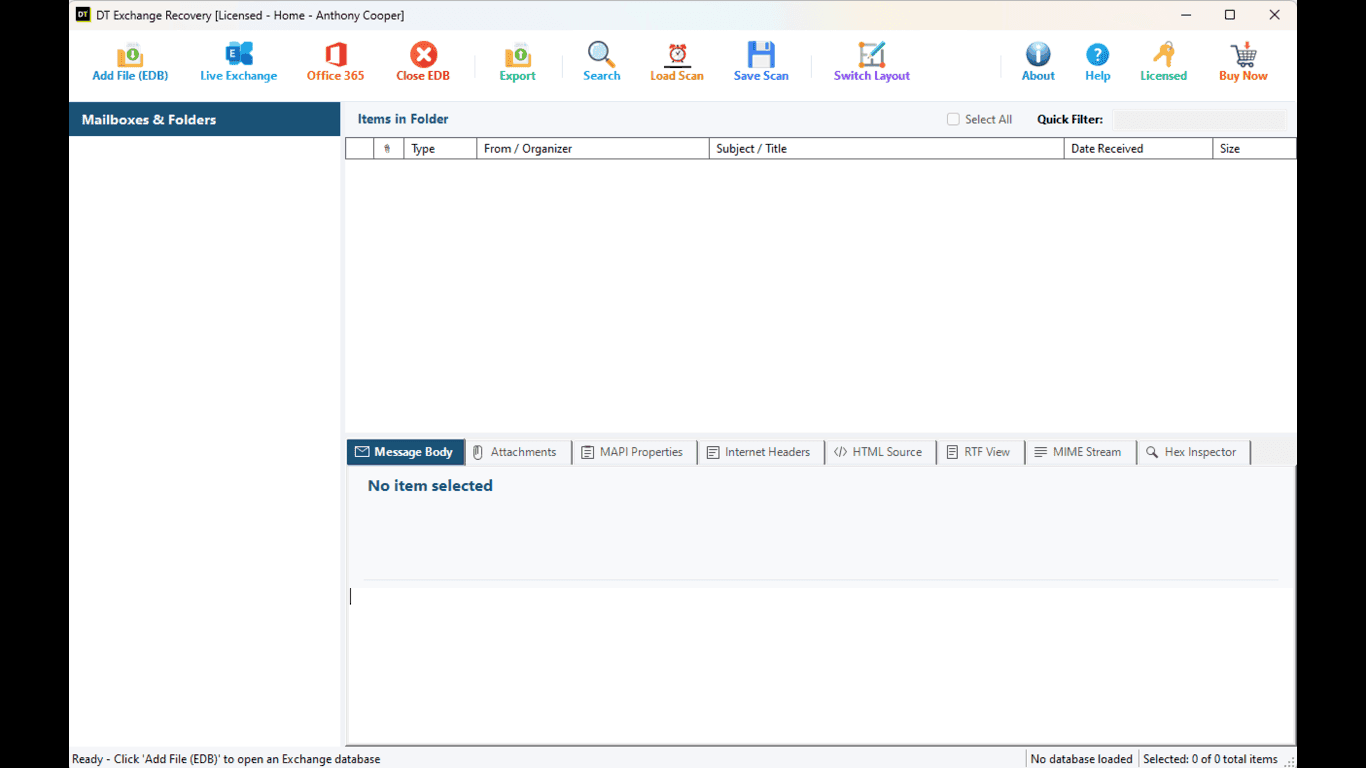
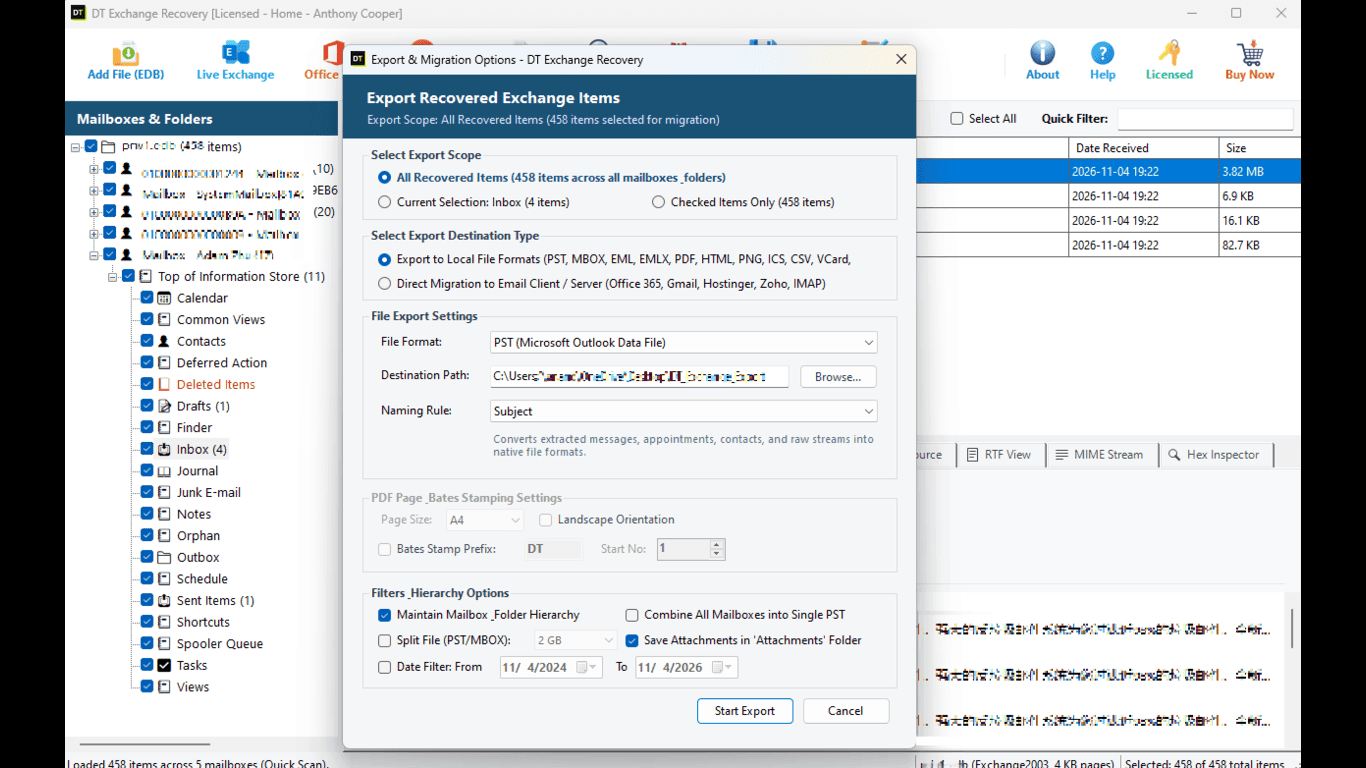
Quick Summary:DT EDB to PST Converter is a Windows x64 application that converts Exchange EDB files to Outlook PST. It works on healthy, corrupted, dismounted and orphaned databases from Exchange 2000 to 2019 and Exchange SE, needs no running Exchange Server, and exports to PST, PDF with Bates stamping, EML, MSG, HTML, MBOX and CSV, or migrates to Exchange over EWS.
Mailbox Conversion & Extraction Rate
Comparative conversion integrity benchmark evaluated across healthy, dismounted, and retired Exchange database mailboxes converting to Outlook PST. Results verify complete item extraction (emails, contacts, calendars, tasks, notes, attachments, and folder structure).
Key Features at a Glance
Practical, reliable tools to convert and export Exchange mailboxes without complex server setups.
Converts EDB to PST from Exchange 2000, 2003, 2007, 2010, 2013, 2016, 2019 and Exchange Server SE
Works offline, no Exchange Server, Active Directory or Outlook required
Quick Scan for healthy databases and Advance Scan for corrupted or dismounted ones
Recovers mails, contacts, calendars, tasks, notes and journals together
Single processing for one database, batch processing for many in one run
Forensic preview with Normal, Hex Editor, MAPI Properties, RFC 822 Headers, RTF View and MIME Stream tabs
Quick Filter and Select All to export only what you need
Exports to PST, PDF with Bates stamping, EML, MSG, HTML, MBOX and CSV
Direct migration to Exchange over EWS, no in-between PST
Clean-room .NET 9 engine that does not depend on Exchange or Outlook components
Reads the source EDB and writes to a separate destination, so the original stays untouched
Native Windows x64 application
When Do You Need an EDB to PST Converter?
Nobody goes looking for an EDB converter on a quiet day. It usually starts with a ticket, a deadline or a dead server. These are the five situations we see most.
The server is gone, the EDB file is not
A retired Exchange server leaves its database on a file share, an external disk or an old backup. Then someone asks for one user's mail from three years ago. You do not need to rebuild Exchange for that. Open the file, find the mailbox, and take it out as a PST.
The database will not mount
A power cut or forced reboot leaves the database in a dirty shutdown state and Exchange refuses to start it. Converting the mailboxes to PST gets people back into Outlook while you sort out the server at a calmer pace.
You are decommissioning or consolidating
Old Exchange 2007 and 2010 databases pile up during upgrades. Convert them in batch, archive the PSTs, and shut the old hardware down without leaving mail behind.
A legal, audit or compliance request lands
You are asked for specific mailboxes, handed over in a form that can be cited page by page. The PDF export with Bates stamping numbers every page for you, and you never touch production.
You are moving mail to another platform
PST goes to Outlook, MBOX goes to Thunderbird and Apple Mail, EML goes to almost everything, and EWS writes straight into a live Exchange mailbox. One scan, any of those exits.
What Data Can You Convert from an EDB File?
An EDB file holds far more than email. All six item types below are read in the same pass, so a user's data returns as the full picture they remember. Nothing has to be switched on first.
Mails
Messages with sender, recipients, dates, body and attachments
Contacts
Address book entries stored in the mailbox
Calendars
Appointments, meetings and recurring events
Tasks
To-do items with status and due dates
Notes
Sticky notes saved in the mailbox
Journals
Journal entries that track activity
Supported Exchange Versions
The tool reads ESE databases, the storage engine behind every Exchange mailbox store.
| Exchange Version | Database Type |
|---|---|
| Exchange Server SE (Subscription Edition) | ESE (.edb) |
| Exchange Server 2019 | ESE (.edb) |
| Exchange Server 2016 | ESE (.edb) |
| Exchange Server 2013 | ESE (.edb) |
| Exchange Server 2010 | ESE (.edb) |
| Exchange Server 2007 | ESE (.edb) |
| Exchange Server 2003 | ESE (.edb) |
| Exchange Server 2000 | ESE (.edb) |
Migration and clean-up projects rarely involve a single version. An Exchange 2007 database found on a forgotten share and a 2016 database from last month's crash can be opened in the same session, with the same steps.
Which Output Format Should You Pick?
Seven output formats plus direct EWS migration give you complete freedom for any mailbox recovery or compliance review:
| Output | What It Is | Pick It When |
|---|---|---|
| PST | An Outlook data file | You are handing a mailbox back to a user or archiving it |
| PDF with Bates stamping | Pages carrying a sequential Bates number | Discovery, audits and compliance reviews |
| EML | One standard message file per email | Archiving, forwarding, opening in most mail clients |
| MSG | One Outlook message file per item | Evidence folders and Outlook-centred workflows |
| HTML | One web page per message | Intranets, browsers, quick sharing |
| MBOX | A mailbox container file | Thunderbird, Apple Mail and other MBOX clients |
| CSV | A spreadsheet of item details | Reports, contact lists, checks in Excel |
| EWS migration | Items written into a live Exchange mailbox | Moving data to a new server without a PST in between |
Features of DT EDB to PST Converter, Explained
A practical look at the 15 core technical capabilities built into the software:
1. Quick Scan for healthy databases
Plenty of EDB files are not broken, just old or copied off a retired server. For those, Quick Scan loads the file fast, builds the mailbox tree and lets you start browsing. There is no reason to sit through a deep inspection on a file that is in good shape.
2. Advance Scan for corrupted and dismounted databases
When a database will not mount, switch to Advance Scan. It reads the file more thoroughly and pulls out items a fast pass would skip. A dirty shutdown, a failing disk or a bad repair attempt will not stop you from seeing what is still readable. Choose the scan that matches the damage, not the one that sounds more impressive.
3. All six item types in one pass
A conversion that returns only emails is half a job. Calendars hold commitments and contacts hold years of relationships. Mails, contacts, calendars, tasks, notes and journals are read together and shown under the mailbox they belong to.
4. Preview before you convert
Click any item and read it before a single byte is written. Preview is how you confirm you opened the right database, the right mailbox and the right year, which saves a lot of wasted export time on large files.
5. Six preview tabs for a closer look
Normal shows the message as a reader sees it. Hex Editor shows the raw bytes. MAPI Properties lists stored values such as message class, times and flags. RFC 822 Headers shows the internet headers so you can trace a message's route. RTF View shows the rich text body, and MIME Stream shows the raw source. For an admin this is a debugging aid. For an investigator it is evidence you can check without exporting anything first.
6. Quick Filter and Select All
A large database can hold hundreds of thousands of items and you rarely need all of them. Narrow the list with Quick Filter, then Select All to take everything that matches. The export is smaller, cleaner and much quicker.
7. Export to PST
PST is still what most people ask for, so it is treated as the main road. Choose the mailboxes or items you want and write them to an Outlook data file that opens in Outlook like any normal mailbox.
8. Export to PDF with Bates stamping
If you have worked a discovery request, you know the pain of numbering thousands of pages by hand. Choose PDF with Bates stamping and every page carries a sequential identifier, so it can be cited by number in a case file, a filing or an audit report. It is uncommon in an EDB converter, and for legal teams it can be the deciding feature.
9. Export to EML, MSG and HTML
Sometimes a mailbox should not stay a mailbox. EML and MSG write each message as its own file that is easy to attach, search and archive. HTML writes each message as a web page that opens in any browser without extra software.
10. Export to MBOX
MBOX is the container used by Thunderbird, Apple Mail and many other clients. If a team is leaving Exchange, MBOX gives them mail they can open without Outlook in the picture.
11. Export to CSV
CSV turns a mailbox into rows. It is the quickest answer to a request like: give me a list of everything that arrived in this mailbox last quarter.
12. Direct migration to Exchange over EWS
Why create a PST and import it again when the destination is a live server? Pick the EWS option, enter the server details and an account allowed to write to the target mailboxes, and the recovered items go straight across. It removes a step, and with it a source of mistakes. Read the Microsoft 365 section below before using this route with Exchange Online.
13. Single and batch processing
Use single processing when one database or mailbox deserves your full attention: scan, inspect, export exactly what is needed. Use batch processing when a stack of databases came off a retired server and the deadline does not move. Ten databases one by one means ten rounds of the same clicks. In batch mode it is one run.
14. No Exchange Server, no Outlook
The conversion engine is a clean-room managed implementation on .NET 9, written from scratch. It does not lean on Exchange, Outlook or legacy components to read your file, and the interface stays responsive while it works. Fewer outside dependencies mean fewer things that can break on a recovery machine.
15. Your original EDB stays untouched
The tool reads the database and writes to a separate destination. Keep a copy of the EDB anyway, as you would for any recovery job.
How to Convert EDB to PST: Step by Step
Follow these seven straightforward steps to convert an Exchange EDB file to Outlook PST:
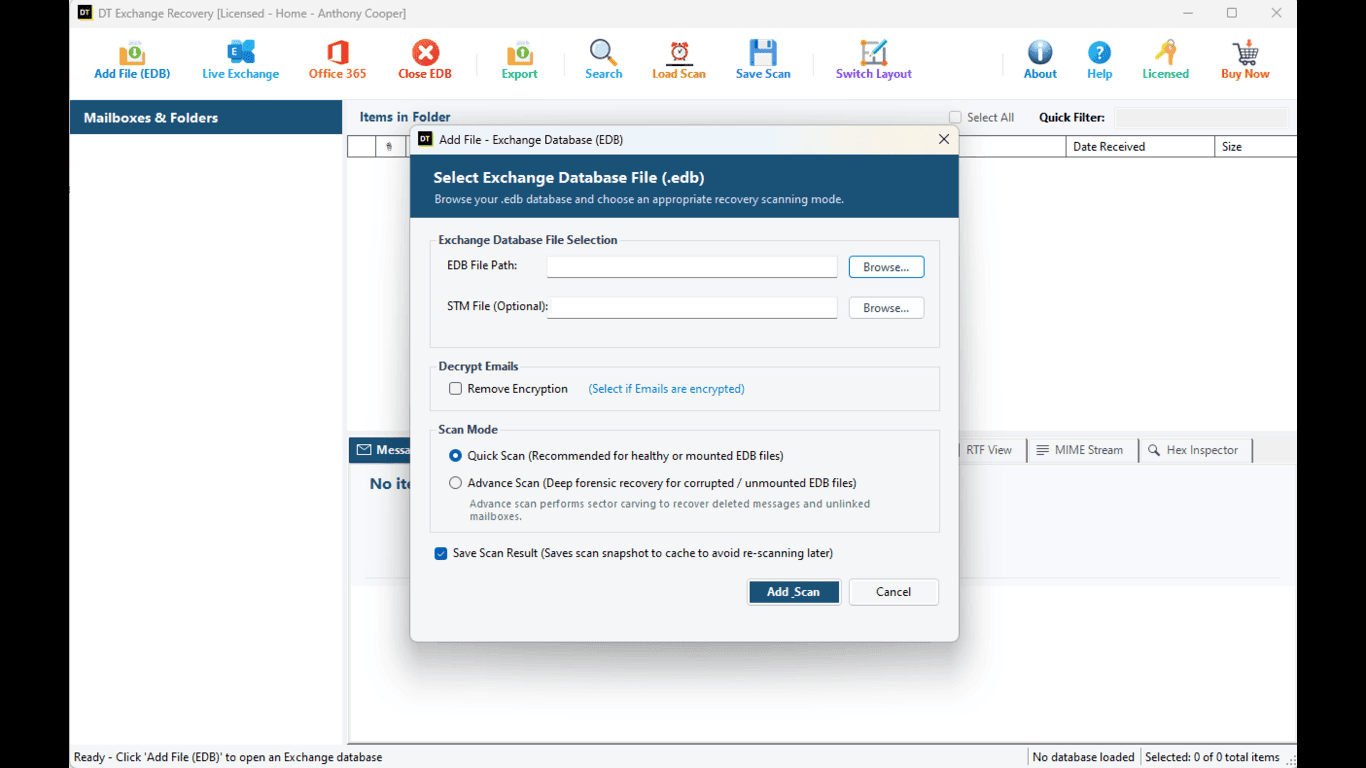
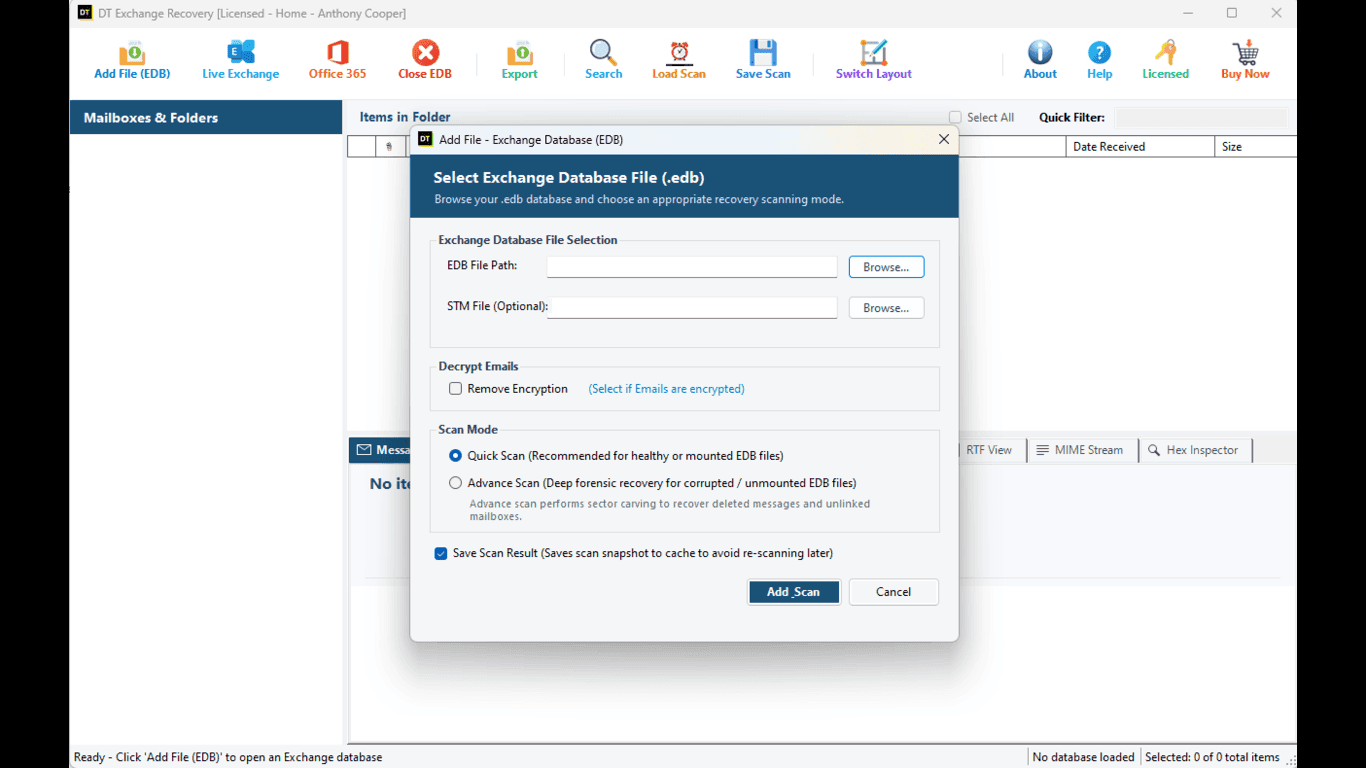
Install DT EDB to PST Converter on Windows x64. Add your EDB file (or batch queue) and select Quick Scan or Advance Scan.
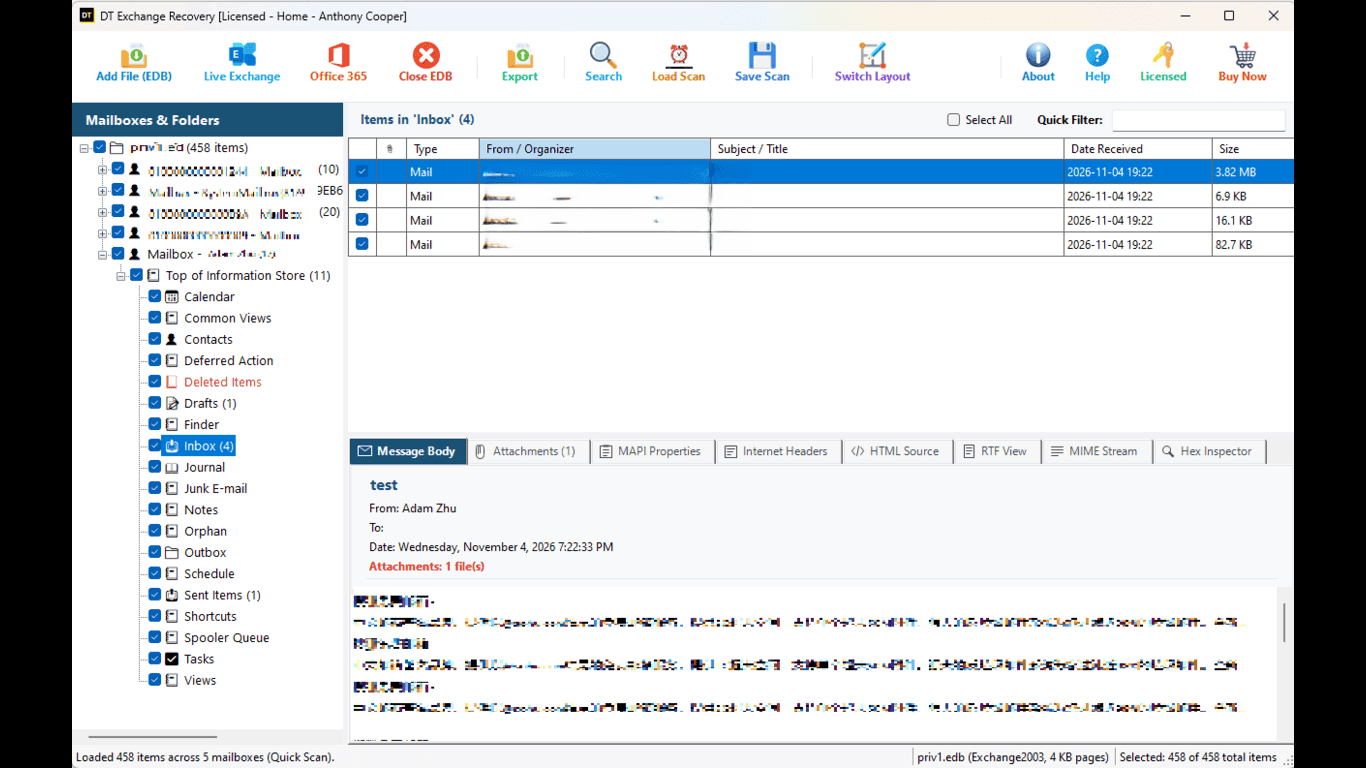
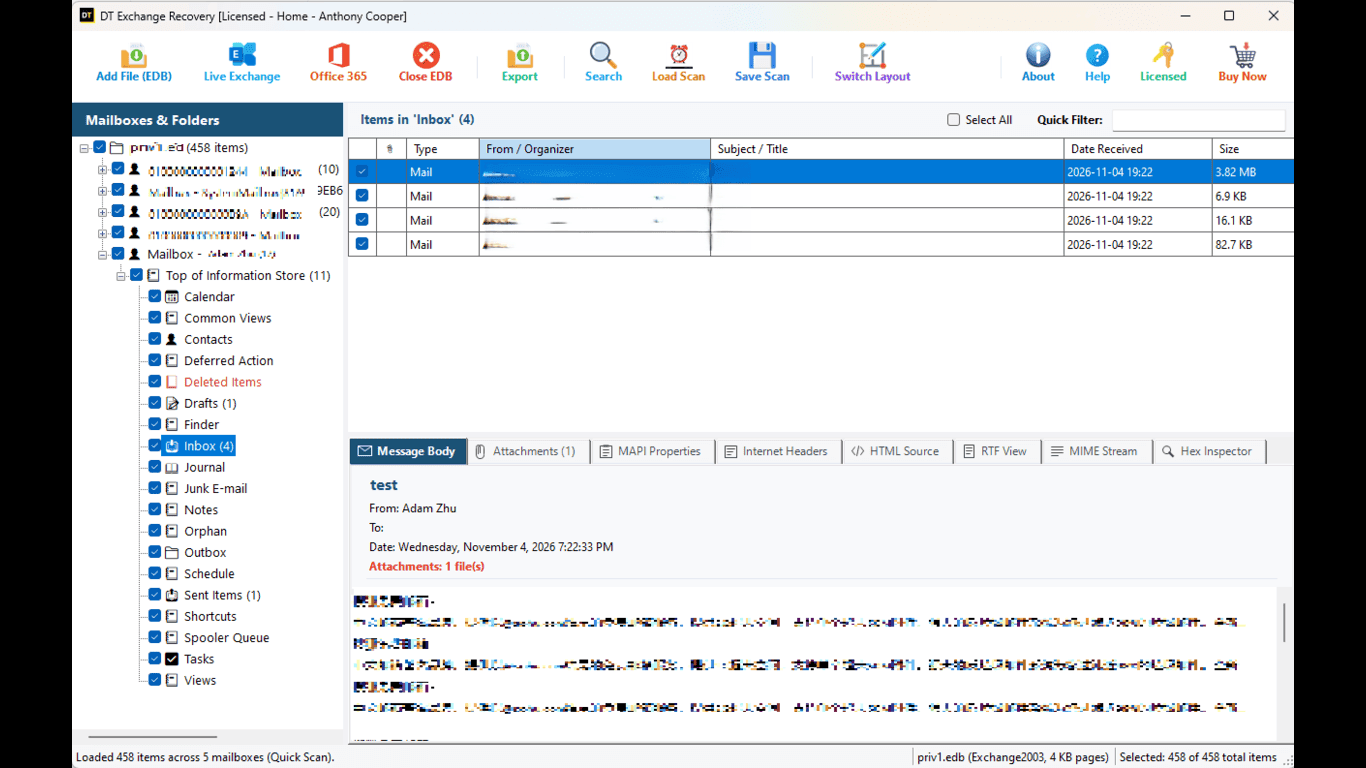
Browse the mailbox tree. Click any item to read in Normal view or inspect Hex, MAPI Properties, RFC 822 Headers, RTF View or MIME Stream.
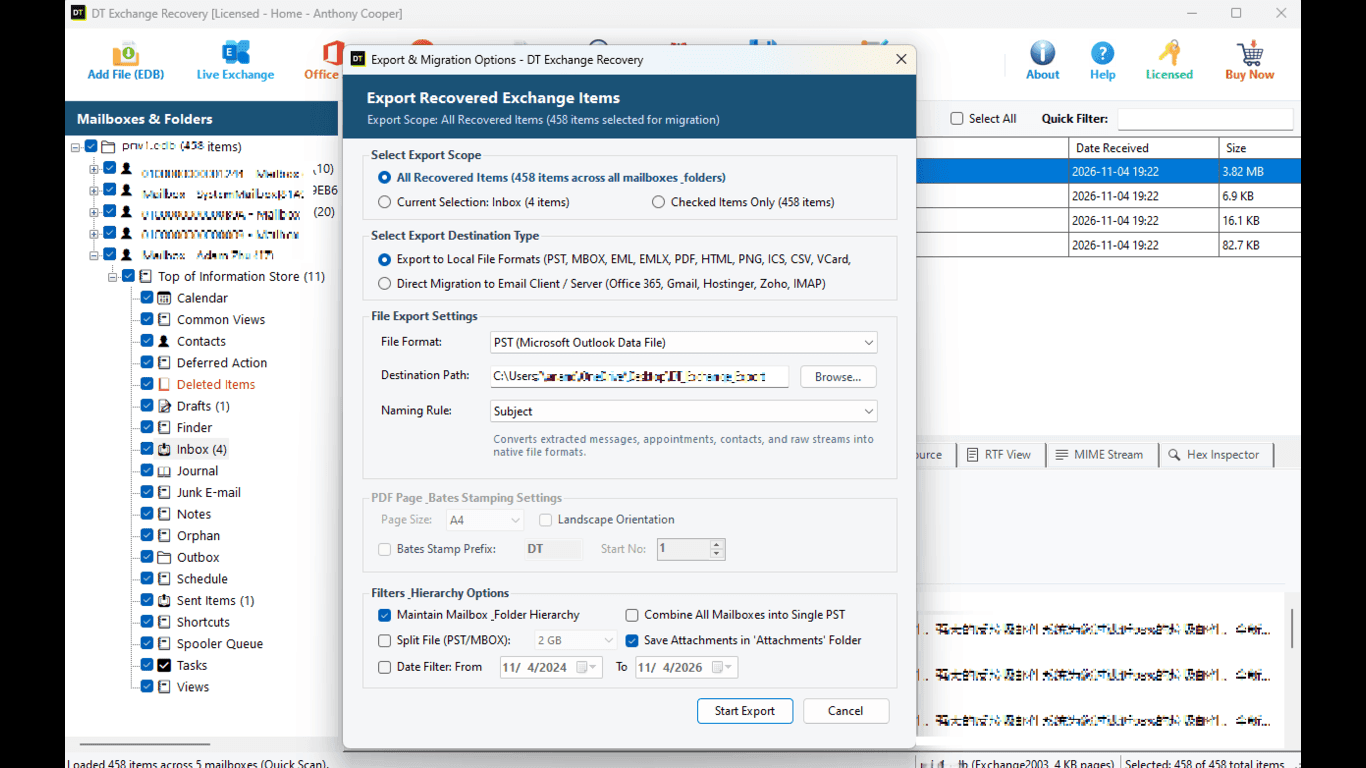
Apply Quick Filter, choose PST as export format, pick a destination folder and start export. Output can also be PDF, EML, MSG, HTML, MBOX or CSV.
- Install DT EDB to PST Converter on a Windows x64 machine and launch it.
- Add the EDB file you want to open. Use batch processing if you have several.
- Choose Quick Scan for a healthy database or Advance Scan for a corrupted or dismounted one, then start the scan.
- Browse the mailbox tree and click any item to read it in the Normal tab.
- Open Hex Editor, MAPI Properties, RFC 822 Headers, RTF View or MIME Stream when you need a deeper look.
- Use Quick Filter and Select All to pick the items you want.
- Open the export options, choose PST, pick a destination folder and start the export.
To get the same items as PDF, EML, MSG, HTML, MBOX or CSV, change the format in step 7. Nothing else changes.
Converting EDB to PST for Microsoft 365
A lot of people search for EDB to Microsoft 365 when what they actually need is the mailbox data inside Exchange Online. Here is the straight version.
Microsoft is retiring Exchange Web Services in Exchange Online. Disabling starts on October 1, 2026, and EWS is permanently removed on April 1, 2027. EWS on Exchange Server, the on-premises product, is not affected.
Direct EWS Route
Destination is an on-premises Exchange Server: use the direct EWS route and write items straight into the target mailboxes without intermediate files.
Export to PST and Import
Destination is Microsoft 365: export the mailboxes to PST and import the files with Microsoft's own PST import options. It is one extra step, but it does not depend on a protocol that is being switched off.
Manual Methods vs DT EDB to PST Converter
Microsoft's own tools are a fair first step in some cases. If a clean backup exists, restoring it beats any conversion. The trouble starts when the only thing you have is a loose EDB file.
| Point | PowerShell export (New-MailboxExportRequest) | Recovery database route | DT EDB to PST Converter |
|---|---|---|---|
| Reads a loose EDB file | No, it works on mailboxes in a running Exchange organization | Yes, after you mount it as a recovery database | Yes, opens the file directly |
| Needs a running Exchange Server | Yes | Yes | No |
| Works on dismounted or orphaned files | No | Only if the database can be brought to a clean state and mounted | Yes, with Advance Scan |
| Preview before export | No | No | Yes, six tabs |
| Setup effort | Role assignment, shared folder path and permissions | Recovery database, restore requests and matching logs | Add file, scan, export |
| Output | PST | PST | PST, PDF, EML, MSG, HTML, MBOX, CSV, EWS |
Free Demo vs Full Version
Scan first, decide later. Download the demo, open your EDB file and see the mailboxes for yourself before you spend anything.
| Feature | Free Demo | Full Version |
|---|---|---|
| Open EDB files from Exchange 2000 to 2019 and Exchange SE | Yes | Yes |
| Quick Scan and Advance Scan | Yes | Yes |
| Preview in all six tabs | Yes | Yes |
| Single and batch processing | Yes | Yes |
| Export to PST and other formats | 25 items per folder | Unlimited |
| Direct migration over EWS | Evaluation mode | Yes |
| 30-day money back | Not applicable | Yes |
Technical Specifications
| Product version | 1.0 |
| Platform | Windows x64 |
| System requirements | Windows 11, 10, 8.1, 7, Windows Server 2022 to 2008 R2; 4 GB RAM; 150 MB disk space |
| Supported Exchange versions | 2000, 2003, 2007, 2010, 2013, 2016, 2019, Exchange SE (ESE databases) |
| Item types converted | Mails, contacts, calendars, tasks, notes, journals |
| Preview tabs | Normal, Hex Editor, MAPI Properties, RFC 822 Headers, RTF View, MIME Stream |
| Export formats | PST, PDF with Bates stamping, EML, MSG, HTML, MBOX, CSV |
| Direct migration | Exchange over EWS |
| Engine | Clean-room .NET 9 managed implementation |
| Processing modes | Single and batch |
| Exchange Server or Outlook required | No |
Field Notes Before You Convert
Small habits that save big headaches on EDB jobs:
Work on a copy
Copy the EDB and its log files to a working folder. Never experiment on the only copy.
Check the database state first
Running eseutil /mh against the file tells you whether it is in Clean Shutdown or Dirty Shutdown. As a rule of thumb, clean means start with Quick Scan, dirty means start with Advance Scan.
If Quick Scan looks thin, run Advance Scan
Missing items on a fast pass usually turn up on the deeper one.
Mind the size of your PSTs
Outlook starts to struggle with very large PST files, and its default limit for a Unicode PST is 50 GB. Export big mailboxes in several passes by selecting folders instead of one giant file.
Leave room on the destination drive
The export needs free space for everything you write out.
Open one PST in Outlook before you trust the batch
Compare folder names and a few item counts against the preview.
Keep the EDB until the user confirms
Disk is cheap. Lost mail is not.
Who Uses an EDB to PST Converter?
Practical solution built for teams handling retired databases, compliance requests and system cleanups:
Exchange Admins
Pulling mailboxes out of dismounted or retired databases.
IT Consultants and MSPs
Handling server decommissions and mixed-version migrations.
Legal, Compliance and Audit Teams
That need mail they can cite by page number.
Forensic and Investigation Staff
Who must read raw bytes, properties and headers.
Small Businesses
That were left with a dead server and a database file nobody can open.
Why Choose DT EDB to PST Converter?
It shows its work
Six preview tabs mean you can check an item at the byte, property and header level before you export anything.
It speaks legal
PDF export with Bates stamping is built in, so a discovery request does not need a second tool.
It does not need a server
No Exchange, no Active Directory and no Outlook on the conversion machine.
It covers the whole job
Scan, preview, filter, export and migrate in one Windows application, from one scan.
About Data TB Software: We build practical software for data recovery, conversion and migration. Every tool runs locally on your device. Your data is never stored, seen or touched by us. Read the EULA and the privacy policy before you buy.
What System Administrators and Consultants Say
Real feedback from technical teams converting offline Exchange databases to Outlook PST.
"Our management decided to shut down our last on-premises Exchange 2013 server after moving to cloud mailboxes, but legal required us to keep full PST copies of 38 executive mailboxes stored in a 420 GB unmounted EDB file. We pointed DT EDB to PST Converter at the file on an external NVMe drive, selected the mailboxes, and let it export. It produced clean PSTs without requiring an Exchange instance or Outlook."
David Keller
Systems Administrator • Columbus, Ohio
"A client gave us a loose Exchange 2010 database from an old VM backup to pull five mailboxes from 2018. Trying to stand up a Recovery Database in PowerShell would have taken half a day of configuration. Quick Scan loaded the mailbox catalog in under two minutes, and I was able to search by date range and export exactly the folders requested."
Stefan Richter
Senior IT Consultant • Frankfurt
"We needed to produce emails from three legacy mailboxes for an external audit with sequential Bates numbers. The fact that this tool can export directly to Bates-stamped PDF files rather than making us convert to PST first, open in Outlook, and then run a separate Bates stamping script cut our turnaround time by 80%."
Colin MacIntyre
Legal Operations Lead • Edinburgh
Frequently Asked Questions
Common questions about converting Exchange EDB databases to Outlook PST files.
QWhat is an EDB to PST converter?
AIt is software that opens an Exchange database file (.edb), reads the mailboxes stored inside and saves their items as Outlook PST files. DT EDB to PST Converter does this offline, without a running Exchange Server.
QCan I convert an EDB file to PST without Exchange Server?
AYes. The engine reads the database file directly on a Windows x64 machine, so the original server does not have to be running or even exist.
QDo I need Outlook installed to convert EDB to PST?
ANo. Outlook is only needed later, when you want to open the finished PST file.
QWhich Exchange versions are supported?
AEDB files from Exchange 2000, 2003, 2007, 2010, 2013, 2016, 2019 and Exchange Server SE (Subscription Edition). Databases from different versions can be opened in the same session.
QCan it convert a corrupted or dismounted EDB file?
AYes. Use Advance Scan, which goes deeper and pulls out as much readable data as possible. Quick Scan is meant for healthy databases.
QWhat is the difference between Quick Scan and Advance Scan?
AQuick Scan loads a healthy database fast. Advance Scan is built for corrupted and dismounted files and takes a more thorough pass. If Quick Scan shows missing items, run Advance Scan.
QWhich items are converted?
AMails, contacts, calendars, tasks, notes and journals, shown in the preview under the mailbox they belong to.
QIs there a size limit on the EDB file?
AThe tool does not cap file size. Scan time grows with the file, and batch processing helps when you have many.
QCan I convert only one mailbox or only some items?
AYes. Use Quick Filter to narrow the list and Select All to take what matches, or tick items by hand, then export only those. Each mailbox can be saved into its own dedicated PST file.
QCan I convert many EDB files at once?
AYes. Batch processing runs many databases in one go, which suits migrations and server decommissions.
QCan I export EDB to PDF with Bates numbers?
AYes. The PDF export can place a sequential Bates number on every page, which law firms and compliance teams use to cite pages in discovery and audits.
QWhich formats can I export to besides PST?
APDF with Bates stamping, EML, MSG, HTML, MBOX and CSV, plus direct migration to Exchange over EWS.
QDoes it work with Microsoft 365?
AFor Microsoft 365, export to PST and import the file with Microsoft's own PST import options. Microsoft is retiring EWS in Exchange Online, with disabling starting October 1, 2026 and a permanent shutdown on April 1, 2027. EWS on on-premises Exchange Server is not affected.
QHow is this different from New-MailboxExportRequest?
AThat cmdlet exports mailboxes from a running Exchange organization. It cannot open a loose EDB file. DT EDB to PST Converter opens the file itself, with no server involved.
QWill it change my original EDB file?
ANo. The tool reads the database and exports to a separate destination. Keep a copy of the EDB anyway.
QDoes it run on Mac or Linux?
ANo. DT EDB to PST Converter is a Windows x64 application.
QIs there a refund if it does not work for me?
AYes. Purchases are covered by a 30-day money-back guarantee. Read the refund policy before you buy.
Related Pages
DT Exchange EDB Recovery Tool
Link from the corrupted and dismounted database parts
DT PST Converter
Convert Outlook PST files to PDF, MBOX, EML, and 20+ formats
DT OST Converter
Convert offline Outlook OST files to PST without Exchange Server
DT PST Migrator
Direct mailbox migration to Office 365 and Exchange
Convert Your EDB File to PST Today
Open the file, preview the mailboxes and decide with real data in front of you.