
Every Byte Matters.
DT Exchange EDB Recovery Tool
Exchange EDB Recovery Tool to Repair Corrupt Databases and Export Mailboxes
A database that will not mount does not mean the mail is gone. DT Exchange EDB Recovery Tool opens corrupt, damaged, offline and dismounted Exchange database files (.edb and .stm) directly, rebuilds the mailbox tree, lets you check every item before you move it, and then exports to PST and 11 other formats or migrates straight into Microsoft 365, live Exchange or any IMAP server. It does not need Exchange Server. It does not need Outlook. It never writes to your original file.
- Opens EDB and STM files from Exchange 2000 to 2019 and Exchange Server SE
- Recovers deleted items and highlights them separately from live items
- 7 preview views per item, including Hex, MAPI Properties and MIME headers
- Migrates directly to Microsoft 365, live Exchange (EWS) and IMAP servers
- Handles very large databases, 100 GB to 500 GB and beyond, on a normal workstation


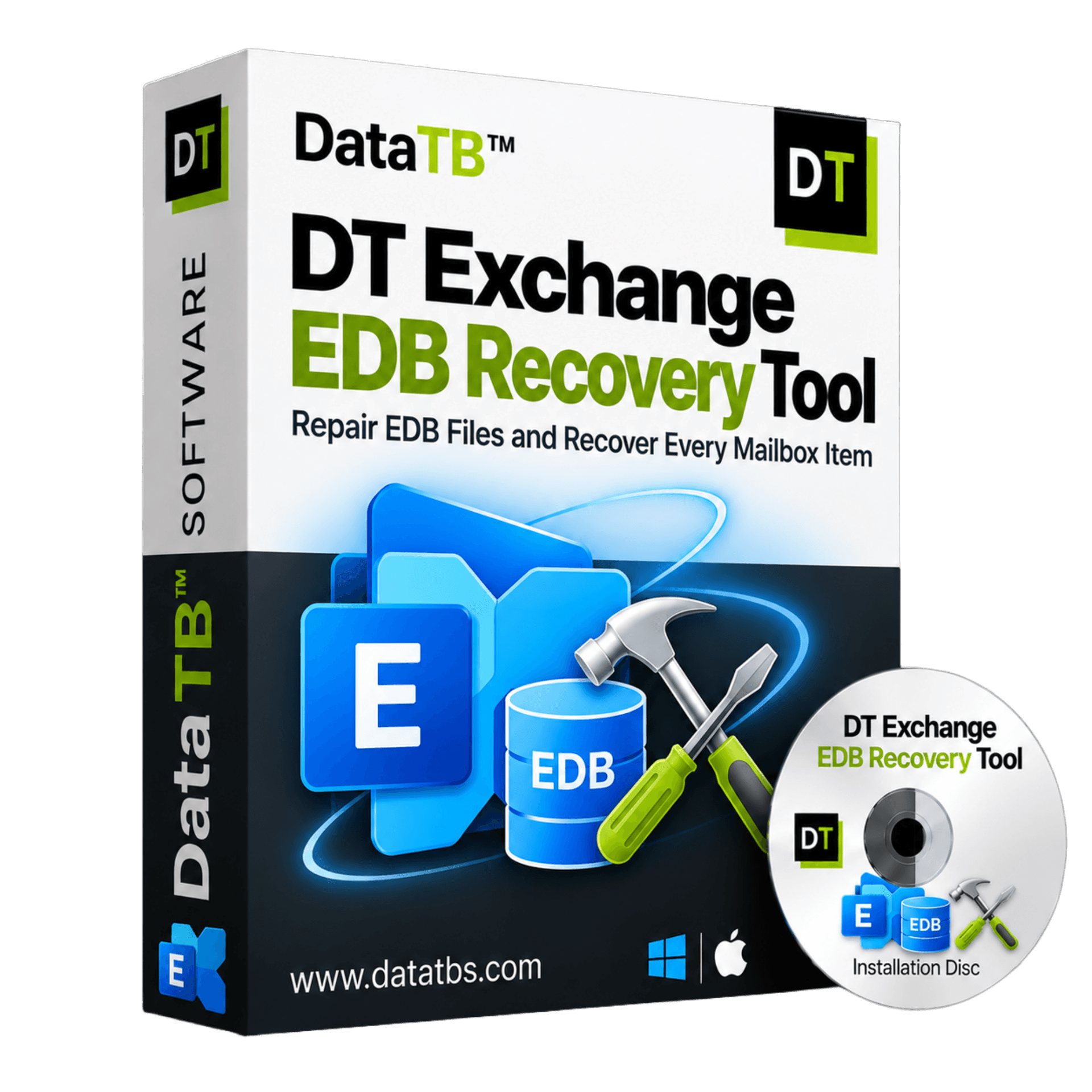
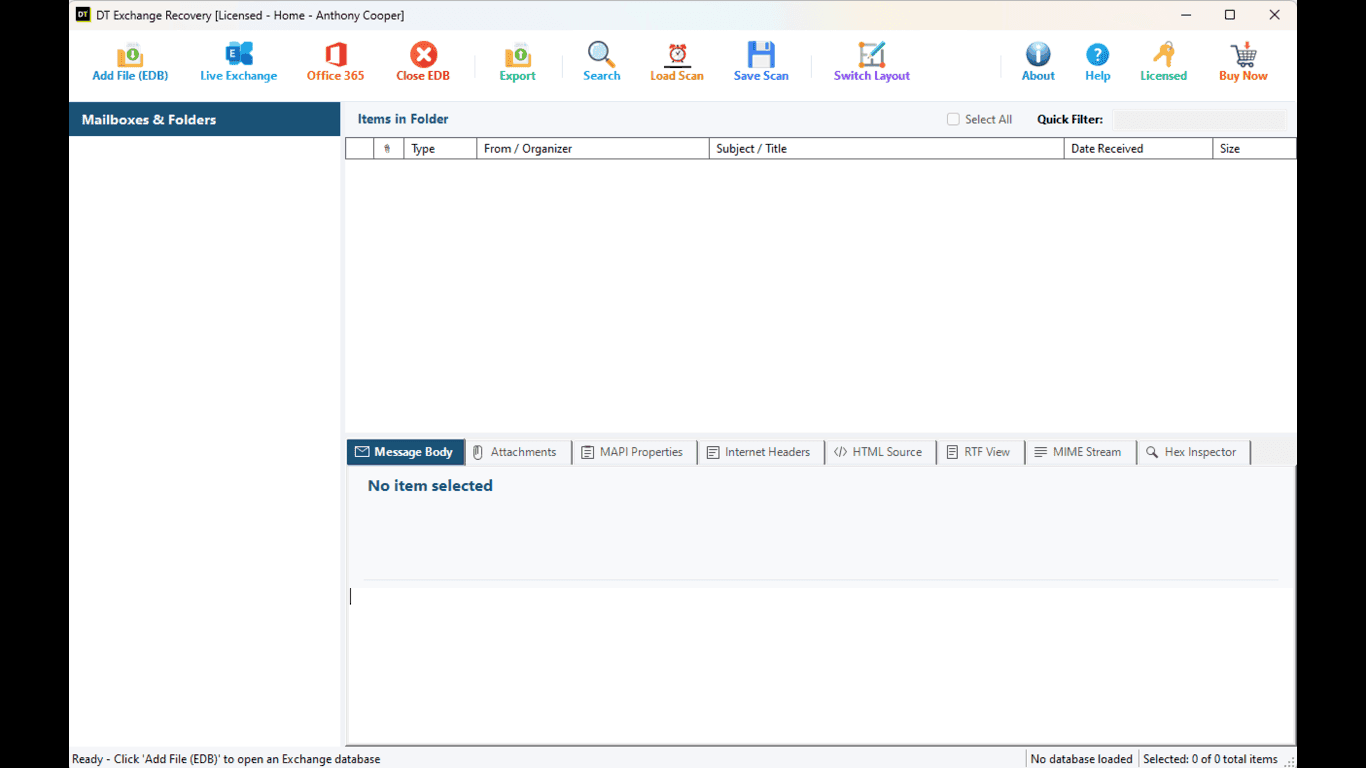
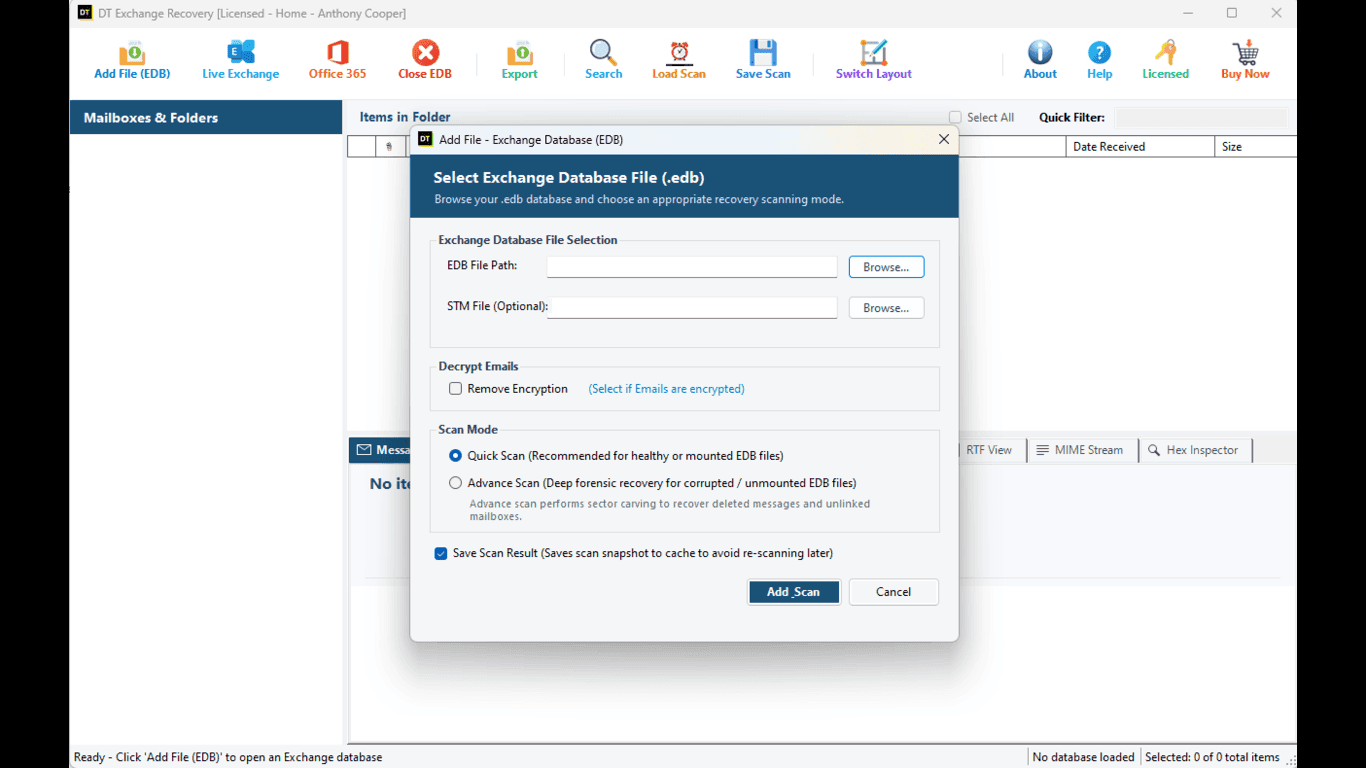
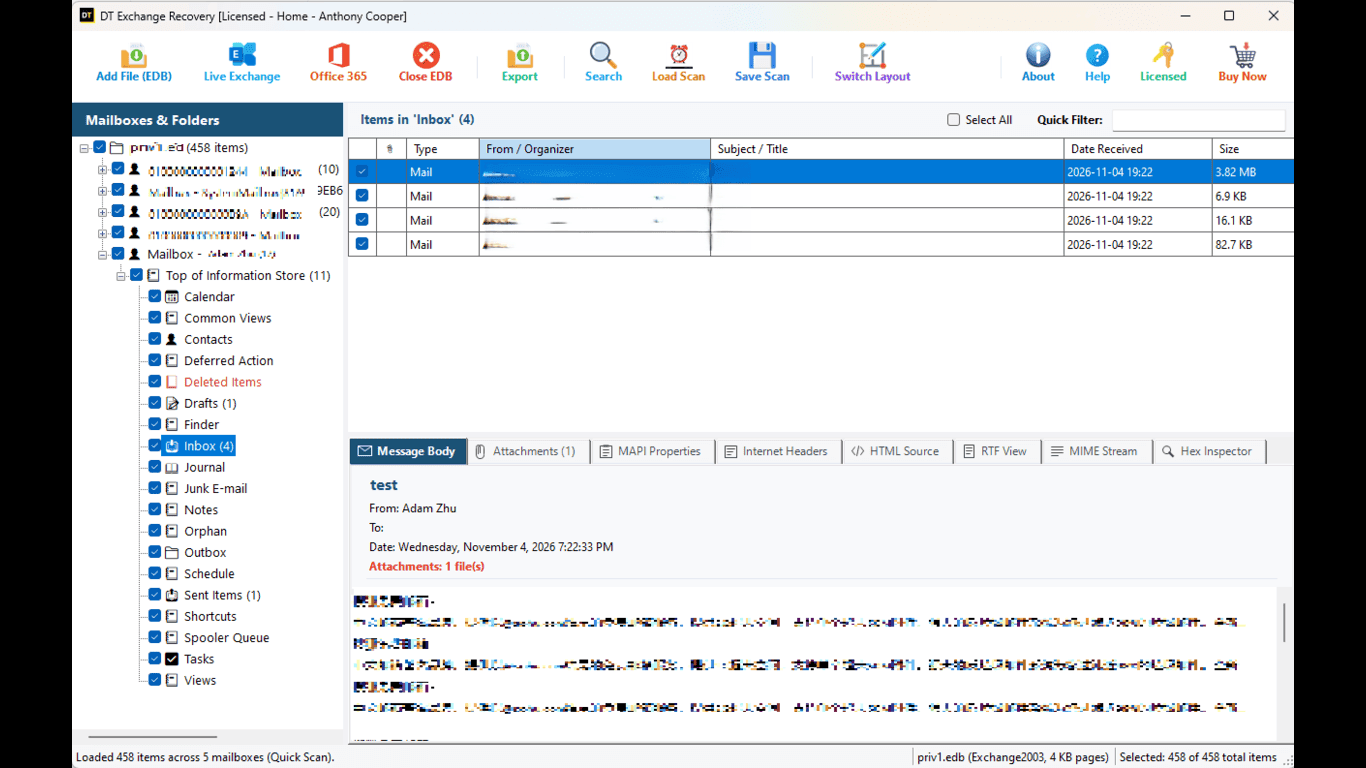
Quick summary:DT Exchange EDB Recovery Tool is a Windows application that repairs corrupt and dismounted Exchange EDB and STM files without Exchange Server, previews every recovered item in 7 views, exports to 12 file formats including PST and Bates-stamped PDF, and migrates directly to Microsoft 365, live Exchange and IMAP mailboxes.
Pick Your Recovery Situation
Database will not mount
Fix the dirty shutdown, ec-1108 and missing log problem without running eseutil on your only copy.
Need a PST file
Extract mailboxes into Outlook-ready PST files.
Need deleted mailboxes or items back
Recover what users and admins removed.
Moving to Microsoft 365
Send recovered mailboxes straight into the cloud.
Legal or audit request
Export Bates-stamped PDF and inspect items at byte level.
Average Recovery Rate
Comparative recovery rate benchmark evaluated across corrupted, unmounted, and dirty shutdown Exchange databases. Results verify recovered mailboxes, folder structures, attachments, and email integrity.
Key Features at a Glance
Everything you need for Exchange database recovery, forensics, export and cloud migration in one standalone workstation.
Reads EDB files from Exchange 2000, 2003, 2007, 2010, 2013, 2016, 2019 and Exchange Server SE
Companion STM file support for legacy Exchange 2000 and 2003 .edb databases
Single and batch processing of many databases in one run
Quick Scan for healthy databases and Advance Scan for corrupted and unmountable ones
Recovers mails, drafts, contacts, calendars, tasks, notes and journals
Recovers Public Folders, Archive Mailboxes and Shared Mailboxes with the full folder hierarchy
Recovers deleted items and permanently deleted mailboxes, highlighted in their own container
No dependency on transaction logs (.log and .chk files)
7 preview views including Attachment Viewer, HTML View, and full S/MIME and PGP decryption
Direct migration to Microsoft 365 using modern Microsoft Entra ID (OAuth2) sign-in
Universal IMAP migration for Gmail, Google Workspace, Zoho Mail, Hostinger and corporate servers
One-click Test Connection before any migration starts
Multi-mailbox deep search with subject, sender, recipient, body, date range and attachment filters
Quick Filter, Select All and smart file naming for exported messages
12 export formats (PST, PDF with Bates stamping, MSG, EML, EMLX, MBOX, VCF, ICS, CSV, JSON, HTML, PNG)
Read-only access to the source database with zero changes to original files
Single standalone executable with no extra runtime to install, tested past 500 GB
Supported Exchange Versions
The tool reads ESE databases, the storage engine behind every Exchange mailbox store.
| Exchange version | Database files |
|---|---|
| Exchange Server SE (Subscription Edition) | .edb |
| Exchange Server 2019 | .edb |
| Exchange Server 2016 | .edb |
| Exchange Server 2013 | .edb |
| Exchange Server 2010 | .edb |
| Exchange Server 2007 | .edb |
| Exchange Server 2003 | .edb and .stm |
| Exchange Server 2000 | .edb and .stm |
Migration projects rarely deal with one version. A 2007 database found on an old file share and a 2019 database from last night's crash can be opened in the same session.
Core Recovery Capabilities
Recover Severely Corrupted and Dismounted Databases
A server crash, a sudden power cut, a hardware fault or a dirty shutdown can leave a database that Exchange refuses to mount. The tool works on the file itself, offline, so none of that matters. You point it at the EDB, run a scan and watch the mailboxes appear. No Exchange Server environment is rebuilt, and no dummy server is needed.
Recover Deleted Items and Permanently Deleted Mailboxes
When a user deletes an email, a contact or a calendar entry, or an admin purges a mailbox, Exchange removes the pointer first and the data later. The tool carves that leftover data out of the database pages and shows it in a separate, clearly marked container. You always know which items are live and which were salvaged, so nobody has to guess.
Legacy .edb and STM Support
Exchange 2000 and 2003 stored message bodies in a separate streaming file next to the database. The tool correlates the two automatically and rebuilds each full message. Many recovery tools quietly skip this, and messages come back with missing bodies. Here, you add the EDB and the matching STM file is used for you.
Public Folders, Archive and Shared Mailboxes
A company is more than user mailboxes. The tool recovers shared mailboxes, archive mailboxes and EDB Public Folders with their original hierarchy, so a department folder comes back as a department folder.
Read-Only and Non-Destructive
The source file is only ever read. Nothing is written back, so the original stays exactly as you found it. That matters for evidence, and it matters when the file is your only copy.
Two Scan Modes, Chosen by the Damage
Quick Scan
For healthy, cleanly dismounted or lightly damaged databases. It prepares the mailbox list, folder tree and item catalog in seconds. A database copied from a retired server rarely needs more than this.
Advance Scan
For databases that are badly corrupted, will not mount or have a broken catalog. It goes through the physical pages of the file and pulls out orphaned messages and data left in unused space. If Quick Scan shows missing folders or items, run Advance Scan on the same file.
7 Preview Views to Verify Every Item Before Export
Most tools show a message the way Outlook would and stop. Here every item opens in seven views, so you can confirm what was recovered before a single file is written.
Normal Message View
Subject, sender, recipients, date and time, body and formatting.
Attachment Viewer
Inspect embedded attachments inside the tool, or double-click to open them in your default application.
Hex View
The raw bytes in a 16-byte offset grid with hexadecimal and ASCII columns. Useful for forensics and for judging how much of a damaged item survived.
MAPI Properties
The low-level Exchange properties, with property IDs, data types and stored values.
MIME RFC-822 Headers
The original transport headers, including DKIM, SPF, IP routes and hop details, so you can trace where a message travelled.
HTML View
The body as a modern web page.
RTF View
The body as native Microsoft rich text.
S/MIME and PGP Decryption
Encrypted mail usually blocks a recovery job. Provide the certificate or key and the tool previews password-protected and certificate-encrypted messages (smime.p7m and OpenPGP) as plain text, and exports them the same way.
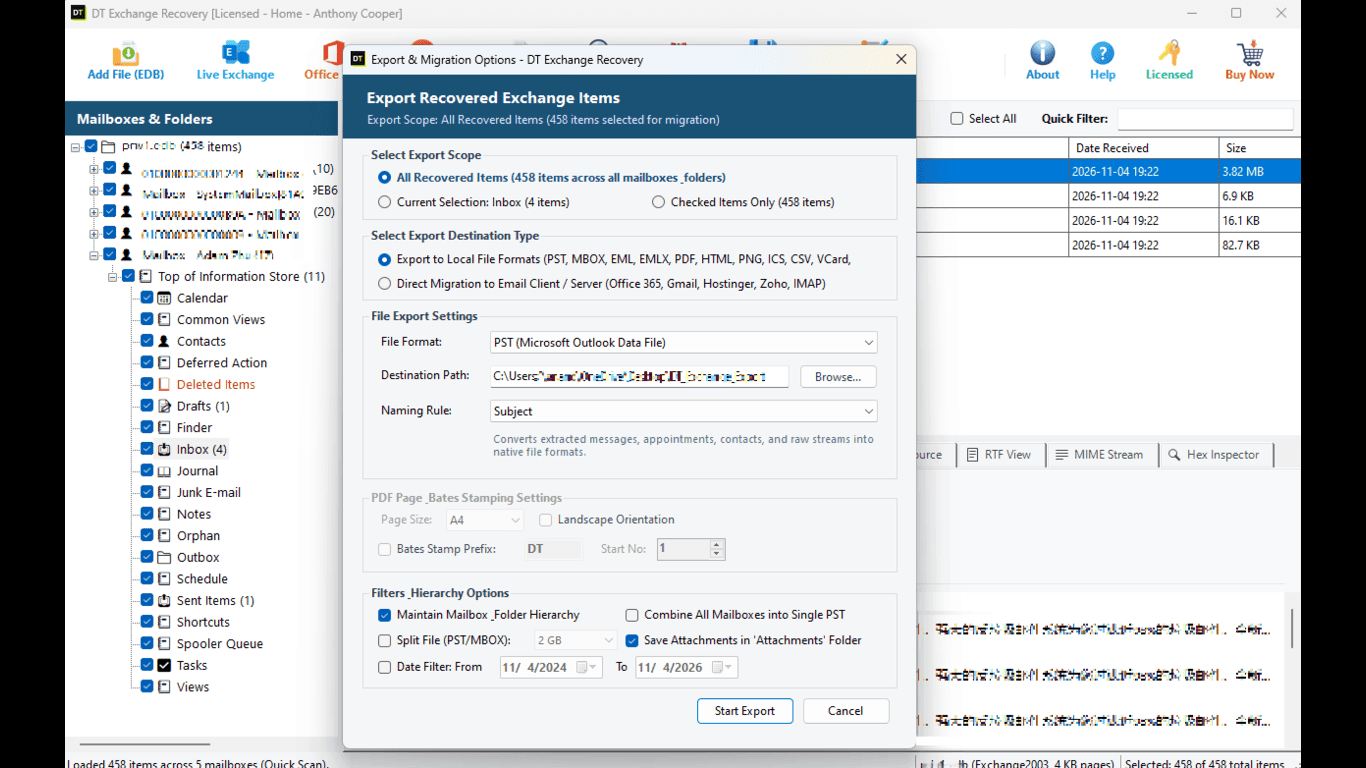
Export to 12 Formats Without Outlook
Every format below is written without Outlook or any other mail client installed.
| Format | What you get | Best for |
|---|---|---|
| PST | Unicode Outlook data file, up to 50 GB per file, original folder hierarchy kept | Giving a mailbox back to a user, archiving |
| PDF with Bates stamping | Sequentially numbered pages in A4, A3 or Letter, portrait or landscape, custom numbering | E-discovery, legal submission, audits |
| MSG | One Outlook message file per item | Evidence folders, Outlook users |
| EML | One standard message file per email | Thunderbird, Windows Live Mail, archiving |
| EMLX | Apple Mail message files | Mac users |
| MBOX | Cross-platform mailbox container | Thunderbird and Unix mail clients |
| VCF | Contacts as vCard files | Phones and address books |
| ICS | Appointments and meetings as iCalendar files | Any calendar app |
| CSV | Item details as rows | Reports, Excel checks, indexing |
| JSON | Structured item data | Audits and custom pipelines |
| HTML | One web page per message | Browsers, intranets |
| PNG | Message rendered as an image | Quick sharing and visual records |
Exports keep original timestamps, read and unread status, nested folders and attachments.
Smart File Naming
Choose how exported message files are named: Subject, Date plus Subject, From plus Subject, or an MD5 hash. A folder of 40,000 EML files is only useful if you can find the one you need.
Migrate Straight from EDB to Microsoft 365, Exchange or IMAP
Why build a PST, copy it across and import it again when the mailbox can go straight to its destination? Recovered items are written directly into live mailboxes, and nothing is saved to a local drive in between.
Direct Microsoft 365 Migration
Sign in with modern Microsoft Entra ID (OAuth2) authentication and send recovered mailboxes straight into target cloud mailboxes.
Live On-Premises Exchange Migration
Transfer to an on-premises Exchange server over Exchange Web Services (EWS) with an account that can write to the target mailboxes. EWS on Exchange Server itself is not affected by Microsoft's cloud retirement.
Universal IMAP Migration
Push mail into Gmail, Google Workspace, Zoho Mail, Hostinger or any corporate IMAP server over secure SSL/TLS.
Test Connection Before You Start
One click validates your credentials and server connectivity, so a wrong password is found in seconds and not after two hours.
Prefer the PST Route for Microsoft 365?
Export to PST with the tool and use Microsoft Purview network upload if your tenant policy requires it. Both routes are supported, and you pick whichever fits your change process.
Search, Filter and Select Exactly What You Need
A large database can hold millions of items, and you rarely need all of them.
Multi-Mailbox Deep Search
Search across mailboxes by Subject, From, To, body text, date range and Has Attachment.
Quick Filter and Select All
Narrow the list, then take everything that matches.
Targeted Output
Result: a smaller export and a much shorter wait.
Built for Very Large Databases
Databases of 100 GB to 500 GB and more are processed with a small memory footprint, without freezing or crashing the machine. There is no file size limit in the tool. The whole product is a single standalone executable, so there is nothing else to install on the recovery machine, and it launches immediately.
Technical Specifications
| Item | Details |
|---|---|
| Supported Exchange versions | 2000, 2003, 2007, 2010, 2013, 2016, 2019 and Exchange SE |
| Supported input files | Exchange database (.edb), companion streaming file (.stm) |
| Database types | Mailbox databases, Public Folders, Archive Mailboxes |
| Export formats | PST, MSG, EML, EMLX, MBOX, PDF, HTML, PNG, ICS, VCF, CSV, JSON |
| Migration targets | Microsoft 365, on-premises Exchange (EWS), Gmail, Google Workspace, Zoho Mail, Hostinger, custom IMAP |
| Outlook required | No |
| Exchange Server required | No |
| Operating systems | Windows 11, Windows 10, Windows Server 2025, 2022, 2019 and 2016 (64-bit) |
| Database size limit | None, tested on 500 GB and larger files |
| Installer | Single executable, no extra runtime |
Fix Unable to Mount Database Errors Without Data Loss
Exchange insists on a clean database and a complete log sequence before it will mount. When either is missing, users lose mail access at once. The tool skips the mount process completely and reads the database directly, so recovery does not depend on what the Information Store thinks of the file.
| Error | What it usually means | How the tool deals with it |
|---|---|---|
| JET_errDatabaseInconsistent (-550) | Dirty shutdown, logs not fully played | Rebuilds the mailbox structure from the database itself |
| Unable to mount, ec=-1108 | Missing log generations or damaged page pointers | Advance Scan rebuilds the mailbox tree without log replay |
| JET_errReadVerifyFailure (-1018) | A page failed its checksum, often a storage fault | Skips unreadable pages and recovers the healthy ones around them |
| JET_errDiskIO (-1022) | The disk could not finish a read or write | Reads what is readable and carries on |
| JET_errDatabaseCorrupted (-1206) | The database structure is damaged | Advance Scan carves items from raw pages |
| JET_errAttachedDatabaseMismatch (-1216) | Logs do not match the database | Works without any log files |
eseutil vs DT Exchange EDB Recovery Tool
eseutil is Microsoft's own utility and a fair first step. If a clean backup exists, restore it. If the database only needs soft recovery and the logs are intact, eseutil /r can bring it back. The trouble starts with hard repair (/p), which throws away pages it cannot read and can lose items without telling you.
| Point | eseutil | DT Exchange EDB Recovery Tool |
|---|---|---|
| Needs Exchange tools installed | Yes | No |
| Changes the original file | Yes | No, read-only |
| Risk of silent item loss | Hard repair discards unreadable pages | Extracts what can be read and marks deleted items |
| Needs transaction logs | Often | No |
| Preview before export | No | Yes, 7 views |
| Hex, MAPI and header inspection | No | Yes |
| Output | Repaired EDB only | 12 formats plus direct migration |
| Page numbering for legal use | No | PDF with Bates stamping |
| Skill needed | Command line and Exchange knowledge | Point and click |
Restore from a verified backup first whenever you can. Use a recovery tool when there is no clean backup, when logs are missing, when a repair has failed, or when you only want some mailboxes and not the whole store.
How to Recover Mailboxes from a Corrupt EDB File
Add the EDB file and scan
Choose your .edb file (and its .stm if it is a legacy database). Run Quick Scan for a healthy file or Advance Scan for a damaged one. The mailbox tree, folder hierarchy and deleted items are rebuilt.
Preview and filter
Open any item in the seven views. Search across mailboxes, filter by date or attachment, and tick only what you want.
Export or migrate
Pick PST, PDF, EML or any other format, or choose Microsoft 365, live Exchange or IMAP, run Test Connection, and start.
When Do You Need an EDB Recovery Tool?
The database will not mount
A crash or power cut left it dirty. Pull the mailboxes out while the server is rebuilt.
An old server left an EDB behind
Compliance wants one user's mail from years ago, and the server is long retired.
You are leaving Exchange
Recover from the file and move to Microsoft 365, Gmail, Zoho or plain PST archives.
A legal or audit request arrives
Find the mailbox, inspect items at byte level and export stamped PDFs without touching production.
A backup restore is incomplete
The only copy of a mailbox is a database file in a backup. Open it and take just that mailbox.
Why Do EDB Files Get Corrupted?
Unclean shutdowns
Power loss or a forced reboot leaves transaction logs unplayed.
Disk and storage faults
Bad sectors, failing controllers or storage that drops writes damage pages.
Missing or damaged log files
Without matching logs, soft recovery cannot finish.
Security and backup software
A scanner that locks database files at the wrong moment can break a running database.
Failed manual repairs
A hard repair can leave a database that mounts but has lost data inside.
Why Choose DT Exchange EDB Recovery Tool?
It recovers more of the file
Broken page chains are carved and healthy neighbours are rebuilt, so the maximum readable data comes back.
It needs no infrastructure
No dummy Exchange server, no Active Directory, no Outlook.
It saves a whole step
Go from EDB straight to a cloud mailbox instead of EDB to PST to upload.
It keeps forensic integrity
Original timestamps, read status, folder nesting and attachments stay as they were.
It shows its work
Check any item at byte, property and header level before export.
It speaks legal
Bates-stamped PDF is built in.
Free Demo vs Full License
| Feature | Free Demo | Full License |
|---|---|---|
| Open healthy and corrupt EDB and STM files | Yes | Yes |
| Quick Scan and Advance Scan | Yes | Yes |
| Recovery without log files | Yes | Yes |
| 7 preview views | Full preview | Full preview |
| Preview deleted items and deleted mailboxes | Full preview | Full preview |
| Export to PST, PDF, MSG, EML, EMLX, MBOX, VCF, ICS, CSV, JSON, HTML, PNG | Not Available | Unlimited |
| Direct migration to Microsoft 365, Exchange and IMAP | Not Available | Unlimited |
| Batch processing of many EDB files | Evaluation | Unlimited |
| Updates and support | Standard support | Free updates and 24/7 priority support |
Real Recovery Stories from IT Engineers
Practical accounts from administrators who repaired corrupt Exchange databases and recovered business mailboxes.
"A hypervisor storage controller failure knocked out our Exchange 2016 mailbox database, leaving it in Dirty Shutdown with error JET_errDatabaseInconsistent (-550). eseutil /p was out of the question because of the risk of hard data truncation. Advance Scan read straight through the damaged B-tree pages and recovered all 140 mailboxes without losing the transaction state."
Jason Vance
Senior Exchange Administrator • Dallas, Texas
"Exchange was throwing hr=0x80004005 and ec=-1108 on mount because log generation files were missing after an ungraceful reboot. DT bypassed the mount dependency completely. We extracted all critical executive mailboxes to split PSTs in read-only mode while the hardware team rebuilt the host."
Graham O'Connor
Disaster Recovery Specialist • Melbourne
"Our primary mailbox store had bad sector read verify failures (-1018). Most tools either freeze or crash when hitting unreadable blocks. This utility skipped past the damaged clusters, recovered all healthy neighboring pages, and gave us a full forensic view in the Hex and MAPI tabs before exporting."
Sergei Morozov
Infrastructure Architect • Montreal
Frequently Asked Questions
QWhat is DT Exchange EDB Recovery Tool?
AIt is a Windows application that opens corrupt, damaged and dismounted Exchange EDB and STM files without Exchange Server, recovers mailboxes and deleted items, and exports them to PST and 11 other formats or migrates them to Microsoft 365, live Exchange or IMAP servers.
QWhich Exchange versions are supported?
AExchange 2000, 2003, 2007, 2010, 2013, 2016, 2019 and Exchange Server SE. Databases from different versions can be opened in the same session.
QDo I need Exchange Server or Outlook installed?
ANo. The tool reads the database file directly on a Windows machine. Neither Exchange Server, Active Directory nor Outlook is needed.
QWill it change my original EDB file?
ANo. The source file is opened read-only and everything is exported to a separate destination. Keep a copy of the EDB anyway, as you would for any recovery job.
QCan it recover a database that will not mount?
AYes. Run Advance Scan. It does not depend on the Exchange mount process or on transaction logs, so errors such as -550, -1018, -1206, -1216 and ec=-1108 do not stop it.
QWhat is the difference between Quick Scan and Advance Scan?
AQuick Scan is for healthy or lightly damaged databases and finishes fast. Advance Scan is for badly corrupted or unmountable ones and goes through the physical pages of the file for more data. If Quick Scan misses items, run Advance Scan.
QCan it recover permanently deleted emails and mailboxes?
AYes, as long as the data has not been overwritten. Deleted items are shown in a separate highlighted container so you can tell them from live items.
QDoes it support Public Folders, Archive Mailboxes and Shared Mailboxes?
AYes, with the original folder hierarchy.
QDoes it work with old .edb and STM files?
AYes. The companion STM file is matched with its EDB automatically so complete messages are rebuilt.
QWhat can I preview before exporting?
AEvery item opens in seven views: Normal, Attachment Viewer, Hex, MAPI Properties, MIME RFC-822 Headers, HTML and RTF.
QCan it open encrypted emails?
AYes. Supply the key or certificate and the tool previews and exports S/MIME and PGP encrypted messages as plain text.
QWhich export formats are available?
APST, PDF with Bates stamping, MSG, EML, EMLX, MBOX, VCF, ICS, CSV, JSON, HTML and PNG.
QWhat is Bates stamping?
AIt places a sequential number on every page so any page can be cited exactly in a case file, court filing or audit. Law firms and compliance teams use it for discovery.
QCan I migrate directly to Microsoft 365?
AYes, using Microsoft Entra ID (OAuth2) sign-in. You can also export to PST and import through Microsoft Purview if your process requires it.
QDoes direct migration still work now that Microsoft is retiring EWS?
AMicrosoft began disabling EWS in Exchange Online on October 1, 2026, with permanent shutdown on April 1, 2027. EWS on on-premises Exchange Server is not affected. For Microsoft 365 use the Entra ID cloud route or the PST route, and use EWS for on-premises Exchange.
QWhich email services can I migrate to over IMAP?
AGmail, Google Workspace, Zoho Mail, Hostinger and any corporate IMAP server, over SSL/TLS.
QIs there a database size limit?
ANo. Databases of 500 GB and more have been processed with a small memory footprint.
QCan I export only selected mailboxes or items?
AYes. Use multi-mailbox search and Quick Filter, then Select All or tick items by hand.
QWhich Windows versions are supported?
AWindows 11 and 10, and Windows Server 2025, 2022, 2019 and 2016 (64-bit).
QDoes it run on Mac or Linux?
ANo. It is a Windows 64-bit application.
QWhen should I use eseutil instead?
AIf you have a good backup, restore it. If the database only needs soft recovery and has its logs, eseutil /r may be enough. When there is no backup, logs are missing or a repair has failed, use the recovery tool.
Related Solutions from Data TB
Recover Your Exchange Mailboxes Today
Scan first, decide later. Download the tool, open your EDB file and see your mailboxes for yourself.