
Quick Summary:
- Definition: Email-to-PDF conversion for legal compliance is the process of safely extracting Outlook
.pstor.msgfiles and saving them as unalterable PDF documents with all original metadata (BCC, timestamps, headers) preserved. - Key Takeaway: While you can manually "Print to PDF" for a single email, legal holds and audits require a dedicated bulk tool to maintain chain-of-custody, preserve folder structures, and process large or corrupted PST archives locally without needing Outlook installed.
Why Email-to-PDF Conversion Matters for Legal and Compliance Teams
Email is one of the most common forms of evidence in litigation, regulatory audits, and internal investigations. Courts, auditors, and compliance officers generally don't want a raw .pst or .msg file - they want a stable, non-editable, easily reviewable record. PDF has become the standard for this because it:
- Cannot be silently edited after export, which supports chain-of-custody requirements
- Renders consistently across systems, unlike Outlook's proprietary file formats
- Can be redacted, stamped, and annotated using standard legal review tools
- Is accepted by most e-discovery platforms and court filing systems
What Counts as a "Legally Sound" Outlook-to-PDF Conversion
Not every PDF export is compliance-ready. A conversion is considered defensible when it preserves:
- Full headers - sender, recipient, CC/BCC, date/time sent and received
- Original formatting - layout, inline images, and signatures exactly as sent
- Attachments - clearly linked to the correct email, not floating as unrelated files
- Folder structure - so reviewers can see where an email sat in the mailbox
- A consistent, repeatable process - so the export can't be argued as selective or altered
Method 1: Manual Conversion (Best for a Few Emails)
For a single email or a short thread, Outlook's native print function is enough.
Steps:
1. Open the email in Outlook.
2. Go to File → Print.
3. Under Printer, select Microsoft Print to PDF (Windows) or Save as PDF (Mac).
4. Click Print, choose a save location, and confirm.
5. Repeat for each attachment separately if you need them as standalone files.
Limitation: this only works if Outlook can still open the mailbox. It also doesn't scale - converting hundreds of emails one by one, and manually re-linking every attachment, isn't something a legal or compliance team should be doing by hand.
Method 2: Bulk PST-to-PDF Conversion for Legal Holds, Audits, and E-Discovery
When the request covers an entire mailbox, a specific date range, or a PST archive that Outlook won't even open anymore, manual export stops being an option. This is the exact situation DT PST Converter is built for.
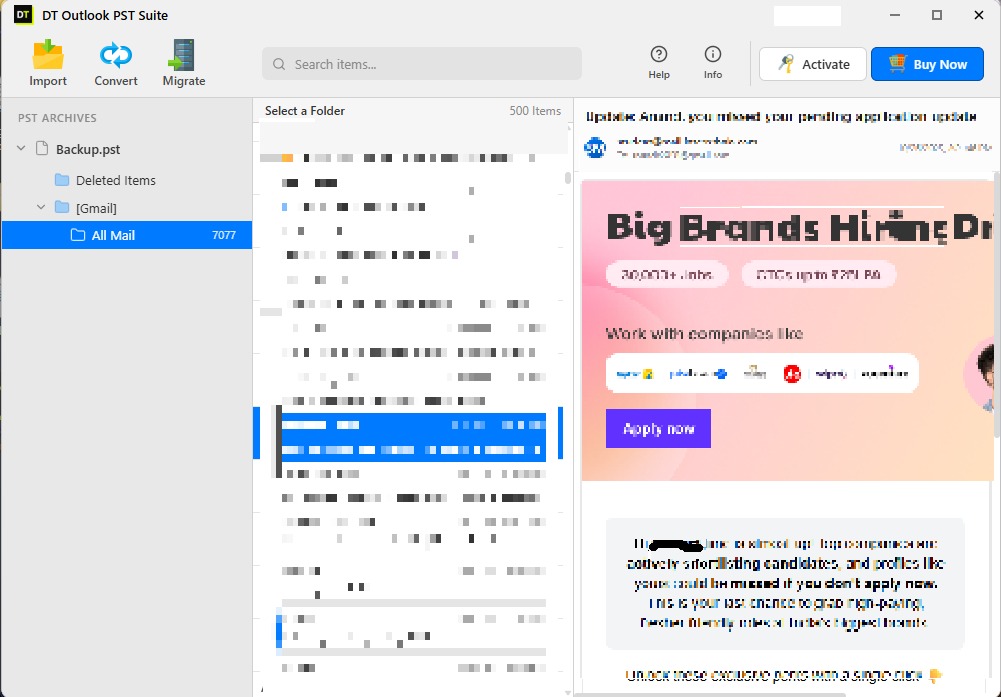
Instead of opening Outlook and printing emails one at a time, DT PST Converter reads the PST file directly and converts everything inside - emails, folder structure, and attachments - straight to PDF, in one batch:
- No Outlook installation needed. It has its own PST-reading engine, so it works even on a machine where Outlook was never installed.
- Works on corrupted PST files. A built-in recovery mode repairs damaged file headers before extraction, so a PST that Outlook refuses to open can often still be converted.
- No file size limit. Tested on PST files well over 100GB, with multi-threaded processing so large mailboxes don't crash or need to be split first.
- Filter before you convert. Pull only what a legal hold actually covers - by date range, folder, sender, or item type - instead of exporting the whole mailbox.
- Headers and metadata preserved exactly. To, From, CC, BCC, subject, date, folder hierarchy, and attachments are kept intact, which is the part a plain Outlook print often gets wrong.
- Batch mode. Load an entire folder of PST files - useful when IT or legal needs to process multiple former employees' mailboxes at once.
- Full conversion report. Every item is logged as converted, skipped, or flagged, exportable as CSV - a paper trail that supports chain-of-custody if the export is ever questioned.
- 100% local processing. The PST file is never uploaded anywhere; conversion happens entirely on your own machine, which matters when the mailbox contains privileged or sensitive material.
Manual vs. DT PST Converter - Quick Comparison
| Factor | Manual (Print to PDF) | DT PST Converter |
|---|---|---|
| Best for | 1–5 emails | Full mailboxes, legal holds, audits |
| Outlook required | Yes | No |
| Works on corrupted PST | No | Yes, with recovery mode |
| Header/BCC preservation | Inconsistent | Preserved exactly |
| Attachment handling | Manual, separate | Linked automatically |
| Filtering by date/sender/folder | No | Yes |
| Time for 500+ emails | Days | Minutes to hours |
| Data leaves your device | N/A | Never - runs locally |
Best Practices for Compliance-Ready Email Archiving
- Keep a conversion log. DT PST Converter's exportable report already covers this - note who ran the export, when, and from which mailbox.
- Don't alter content during export. Redaction, if needed, should happen as a separate, documented step after the original PDF is archived.
- Preserve folder structure in the output. A flat dump of PDFs with no context is harder to defend than an export that mirrors the original mailbox.
- Store exports on access-controlled storage. A compliance-ready PDF loses its value if anyone can quietly edit or delete it afterward.
- Filter to what the hold actually requires. Converting only the relevant date range or custodian folder, rather than an entire mailbox, keeps the export focused and easier to review. (You can also learn about cleaning up your systems beforehand with our Windows Duplicate Files Guide).
- Process locally when the mailbox is sensitive. Uploading a mailbox full of privileged communications to a third-party server adds risk that a local tool avoids entirely.
Who This Guide Is For
Legal teams preparing for e-discovery, compliance officers managing regulatory audits (HIPAA, SOX, GDPR-related record requests), IT administrators executing litigation holds or offboarding employees, and forensic teams that need a structured, timestamped record of email correspondence.
FAQ
Does converting to PDF remove metadata from the original email?
Can I convert an entire PST file to PDF at once?
What if my PST file is corrupted or Outlook won't open it?
Do I need Microsoft Outlook installed to convert PST to PDF?
Can I convert only specific emails instead of the whole mailbox?
Does my PST file get uploaded anywhere during conversion?
How long should converted email records be retained?
Need to convert an Outlook mailbox to PDF for a legal hold, audit, or e-discovery request? Download the DT PST Converter free trial and test it on your own PST file - including corrupted ones - before you buy. See full pricing and plans →
User Reviews
"Converted 40GB PST file to PDF with attachments intact for an audit. Flawless tool!"
"Kept all MIME headers and timestamps clean for eDiscovery. Saved us weeks."